Best Cell Phone Signal Boosters for Seniors (2026): Fixing Dropped Calls Where It Matters Most
A weak-signal bedroom isn't just a dropped call to the grandkids — it's a medical alert pendant or a fall-detection watch that can't reach anyone. A $350-$800 booster fixes it for every phone in the house, no subscription.
As an Amazon Associate I earn from qualifying purchases. We independently review products; buying through our links never costs you extra.
Best for a Single Room or Small Home
weBoost Home Studio
Quick picks
| Product | Best for | Amazon |
|---|---|---|
| weBoost Home Studio | a Single Room or Small Home | Check price on Amazon |
| weBoost Home MultiRoom | Whole-House Coverage | Check price on Amazon |
| SureCall Fusion4Home | Budget Option | Check price on Amazon |
| SureCall Fusion5X 2.0 | Larger or Rural Properties | Check price on Amazon |

Our Top Picks
Chosen for seniors based on features, specs, and verified buyer reviews.
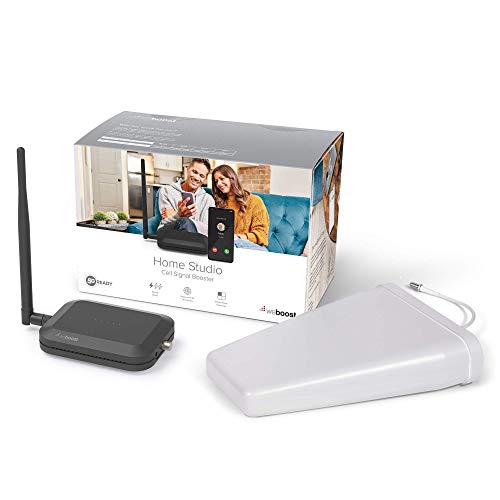
weBoost Home Studio
- Simplest setup of the group, closer to plug-and-play
- Works on every U.S. carrier with no subscription or fees
- Lower cost entry point for a single weak-signal room
- Real-world coverage (250-500 sq ft) is well below the rated 3,000 sq ft
- Not sized for whole-house coverage
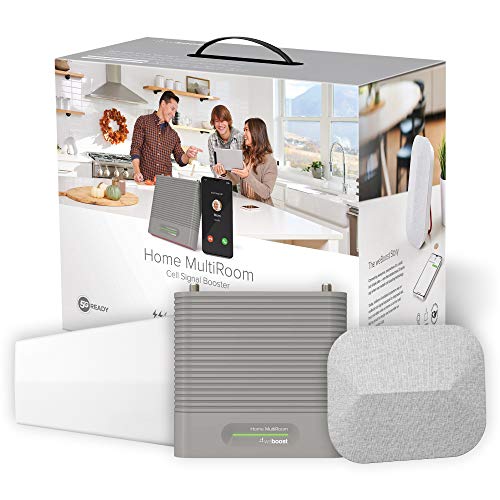
weBoost Home MultiRoom
- Covers several rooms including basements and garages, not just one
- Good fit when multiple household members each need reliable signal
- Carrier-agnostic, no subscription needed
- Requires mounting an outside antenna and running cable — bigger install
- Real-world coverage (2,000-3,000 sq ft) is below the rated 5,000 sq ft
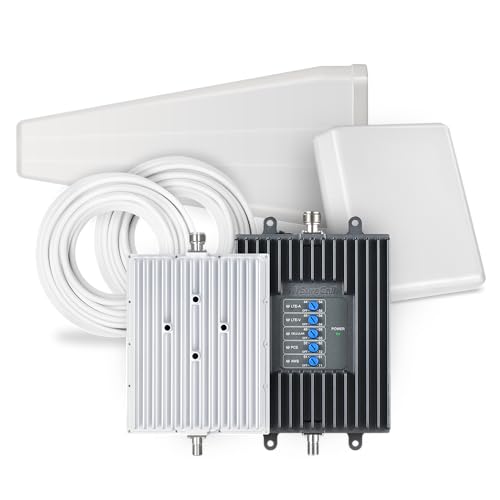
SureCall Fusion4Home
- Lowest price point in this roundup
- Solid fix for a single persistently weak-signal room or two
- No monthly fee or carrier account required
- Limited coverage area compared to whole-house units
- Can't create signal where the outdoor signal is essentially zero
SureCall Fusion5X 2.0
- Covers up to 8,000 sq ft with the highest gain (72 dB) in this lineup
- Best option for weak outdoor signal in rural areas
- Can extend coverage to detached structures like a guest house
- Highest price point here and most involved installation
- May need a directional outdoor antenna or professional site survey
A dropped call isn't just annoying when it's an adult child checking in from three states away, and it's genuinely dangerous when it's a 911 call from a rural property or a medical alert device trying to reach a monitoring center over a weak carrier signal. Cell signal boosters solve a specific, common problem: a home sits in a low-signal pocket — behind hills, thick masonry walls, low-E glass, or just far from the nearest tower — and one bar of service means calls drop, texts queue for minutes, and a smartwatch or medical alert's cellular backup is unreliable exactly when it matters. A booster pulls in the weak outside signal, amplifies it, and rebroadcasts it inside the house for every phone on every carrier, no subscription required.
Our top picks
weBoost Home Studio — Best for a Single Room or Small Home
The Home Studio (also sold as a Manufacturer Certified refurbished kit) is weBoost's entry-level home unit. It's rated for up to 3,000 sq ft under ideal outdoor-signal conditions, though real-world coverage is closer to 250–500 sq ft once walls, distance from the outside signal, and antenna placement are factored in — worth knowing before assuming it'll cover more than a bedroom, home office, or small single-story home. It works on every U.S. carrier (Verizon, AT&T, T-Mobile, and regional carriers riding those networks) and needs no monthly fee. For a senior living alone in an apartment or small home with one persistently weak-signal room — often where a medical alert base station or a landline replacement box sits — this is the right-sized, lower-cost option rather than overbuying whole-house coverage that isn't needed.
Check price on AmazonweBoost Home Studio
weBoost Home MultiRoom — Best for Whole-House Coverage
Rated for up to 5,000 sq ft in ideal conditions (realistically 2,000–3,000 sq ft covering a few rooms, per independent testing), the Home MultiRoom is the step up for a full single-family home rather than one problem room. It's the better fit for a household where multiple people — a senior and a live-in caregiver, or a couple — all need reliable signal in different parts of the house, including a garage or basement where a fall-detection smartwatch or GPS tracker's cellular connection tends to be weakest. Installation involves mounting an outside antenna (roof or exterior wall) and running a cable to an inside unit, which is more involved than the Home Studio's simpler setup — a handy family member or a one-time installer visit is worth budgeting for.
Check price on AmazonweBoost Home MultiRoom
SureCall Fusion4Home — Best Budget Option
SureCall's Fusion4Home is consistently the pick for buyers on a tighter budget, running meaningfully less than the weBoost units while still covering a small home or a couple of rooms with a good outdoor signal to start from. It's a sensible choice for someone who just needs a persistently one-bar spot — often a back bedroom or a walkout basement — pushed up to two or three reliable bars, rather than needing whole-house amplification. As with any booster, results depend heavily on how weak the outside signal already is; a booster amplifies an existing signal, it doesn't create one from nothing, so a location with zero outdoor bars won't be fixed by any indoor booster.
Check price on AmazonSureCall Fusion4Home
SureCall Fusion5X 2.0 — Best for Larger or Rural Properties
This is SureCall's near-commercial-grade unit, covering up to 8,000 sq ft with 72 dB of gain — the highest-powered consumer option in this lineup. It's the right call for a larger rural home, a property with detached structures like a guest house or workshop, or a household in an area with genuinely poor outside coverage where a lower-powered booster wouldn't have enough signal to amplify in the first place. This is a bigger investment and a more involved install (a taller or directional outside antenna is often needed to reach a usable signal), so it's worth confirming the outdoor signal strength with a carrier's coverage map before committing — a professional site survey is sometimes worth the cost at this tier.
How to choose a signal booster
Check outdoor signal first. Before buying anything, walk outside the home holding a phone and check the bar count and the signal strength in the phone's field-test/status menu. A booster amplifies whatever signal already reaches the property — a location with zero outdoor bars needs a bigger, more directional antenna setup (or won't be fixable by any consumer booster), while a location with 1–2 outdoor bars is a great candidate for dramatic improvement.
Match coverage area to the actual problem. Don't buy whole-house coverage to fix one weak room, and don't buy a single-room unit expecting it to cover a two-story house. Be honest about square footage and how many separate rooms need reliable signal.
Confirm carrier compatibility. All four models here are FCC-certified and carrier-agnostic — they boost the standard cellular bands used by Verizon, AT&T, T-Mobile, and the regional carriers riding those networks, with no carrier account or subscription needed. Still worth a quick check against the specific carrier and device (a 5G-only device on an older booster, for example, can behave differently than an LTE phone).
Think about what actually depends on the signal. If a medical alert pendant, a GPS tracker, or a smartwatch's cellular fall-detection feature relies on being inside a specific room (a bedroom, a bathroom) for it to work, prioritize boosting that room specifically rather than assuming general house coverage covers it — some boosters distribute signal unevenly room to room.
Installation complexity. The Home Studio is close to plug-and-play; the MultiRoom and Fusion5X 2.0 require mounting an outdoor antenna and running cable, which is a bigger project. Factor in whether a family member can help with a one-time weekend install or whether a professional installer is worth the added cost.
Common mistakes
Assuming a booster fixes an internet/Wi-Fi problem — these boost cellular signal for calls, texts, and mobile data, not home Wi-Fi. A weak Wi-Fi router is a separate issue with a separate fix.
Placing the outside antenna on the wrong side of the house. The antenna needs to face the direction of the strongest available outdoor signal (often toward the nearest cell tower), not just wherever is most convenient to mount — a walk around the exterior with a signal-strength app first saves a wasted install.
Mounting the inside antenna too close to the outside antenna. They need enough separation (usually specified in the manual, often 15+ feet vertically or diagonally) or the system will "oscillate" and shut itself down to prevent interference — a very common self-inflicted install problem.
Buying based on square footage in a multi-story home without checking whether coverage is rated for one floor or the whole structure — most published sq ft numbers assume open, single-level space, and get cut significantly by additional floors or dense interior walls.
Troubleshooting
Signal improved outside but not much inside: Check the distance and any obstruction between the outside and inside antenna units — thick walls or long cable runs reduce the amplified signal before it's rebroadcast. Shortening the cable run or relocating the inside antenna closer to where it's needed often helps more than expected.
Booster shuts off or the indicator light shows an error: This is almost always the oscillation/interference issue described above — insufficient separation between the inside and outside antennas. Increase the distance between them per the manual's minimum spacing.
One room still weak after installing a multi-room system: Interior antennas broadcast in a pattern, not evenly in all directions — a single antenna placed centrally may still leave a distant or heavily walled room weak. A second interior antenna, sold separately for most multi-room kits, resolves this.
No improvement at all: Confirm the outside signal is actually being received by checking the booster's signal-strength indicator (most have one). If the outdoor signal itself is essentially zero, the unit has nothing to amplify — this points to needing a more powerful or more directional outdoor antenna rather than a defective unit.
FAQ
Do these require a monthly subscription or carrier approval? No — consumer cell signal boosters sold today are FCC-certified to work with all major U.S. carriers automatically, with no subscription, account registration, or carrier permission needed.
Will a booster help a medical alert device or fall-detection smartwatch? Yes, if that device relies on cellular signal (rather than Wi-Fi or a landline base station) and sits within the boosted coverage area. It's worth confirming which connection type the specific device uses before assuming a booster is the fix.
Can one booster cover a whole neighborhood or just one household? Consumer boosters are licensed and designed for a single home or a single vehicle — they're not intended to (and legally shouldn't) blanket a wider area.
Is professional installation required? Not for these consumer models — all are designed for DIY installation, though the higher-coverage units (MultiRoom, Fusion5X 2.0) involve more setup work like mounting an outdoor antenna, and a professional installer is a reasonable option for anyone not comfortable on a ladder.
Will this drain the electric bill or need constant maintenance? No — these run continuously on standard household power at low wattage, similar to a Wi-Fi router, and need essentially no ongoing maintenance beyond an occasional check that the antennas haven't shifted.
If the actual goal is cutting a landline bill rather than fixing a cell signal, that's a different problem with a different fix — see our VoIP home phone systems guide for how to keep the same phone and number for a fraction of the monthly cost.


