Best Fitness Trackers for Seniors (2026): Simpler Than a Smartwatch, Still Useful
Not every older adult wants a smartwatch's notifications, apps, and daily charging routine. A fitness tracker does one job — steps, heart rate, sleep — with a simpler screen, longer battery life, and usually a lower price. Here are three real 2026 options that fit that job well, and where each one falls short.
As an Amazon Associate I earn from qualifying purchases. We independently review products; buying through our links never costs you extra.
Best All-Around Pick
Fitbit Charge 6
Quick picks
| Product | Best for | Amazon |
|---|---|---|
| Fitbit Charge 6 | All-Around Pick | Check price on Amazon |
| Garmin Vivosmart 5 | Simplicity and Comfort | Check price on Amazon |
| Amazfit Band 7 | Budget Pick | Check price on Amazon |

Our Top Picks
Chosen for seniors based on features, specs, and verified buyer reviews.
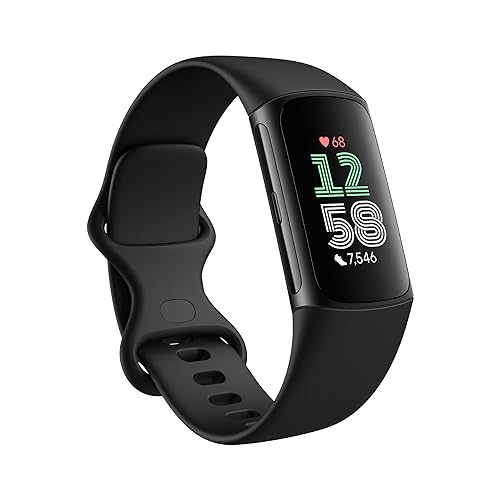
Fitbit Charge 6
- Built-in GPS for accurate route tracking without a phone
- Continuous heart rate plus Google Maps and Google Wallet integration
- Six months of Fitbit Premium included for detailed sleep and readiness reports
- Most polished, family-friendly companion app of the three
- Deeper Premium insights cost $9.99/month or $79.99/year after the trial
- Slightly higher price than the other two picks
Garmin Vivosmart 5
- Thin, lightweight band that's comfortable for all-day wear
- High/low heart rate alerts flag readings worth mentioning to a doctor
- "Fitness age" metric some users find motivating
- About 7 days of battery life per charge
- No built-in GPS — route tracking needs a paired phone
- Garmin Connect app is less polished than Fitbit's
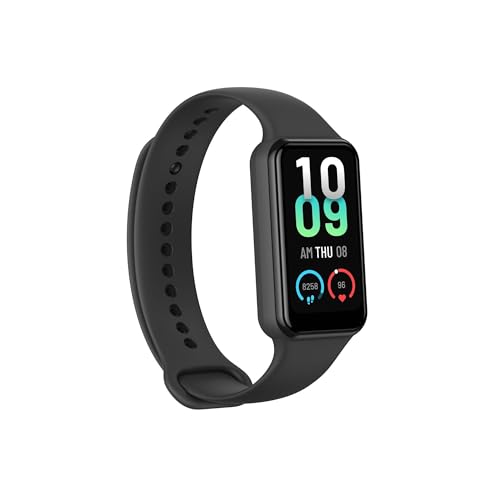
Amazfit Band 7
- Far less expensive than the other two picks
- Longest battery life here, rated up to 18 days
- Large 1.47-inch AMOLED display with built-in Alexa support
- 120 sport modes for a low-cost device
- Health metrics less clinically validated than Fitbit or Garmin
- No built-in GPS, and a less recognized brand for family tech support
A lot of the smartwatch recommendations aimed at seniors assume the buyer wants fall detection, cellular calling, and an app ecosystem. Plenty do — but plenty of people just want to know how many steps they walked today, whether their heart rate looks normal, and how they slept, without learning a new operating system or charging a device every single night. That's the fitness tracker category: a smaller screen, a narrower feature set, and in most cases a battery that lasts closer to a week than a day. None of the three trackers below call for help in an emergency — that's still a job for a medical alert pendant or a fall-detection watch — but for day-to-day activity and health trend tracking, a tracker is often the less frustrating device to actually keep wearing.
What actually makes a tracker good for an older wearer?
Readable at a glance, not just on paper
Spec sheets list screen size, but the number that matters is text size at arm's length in normal light. A 1.4-inch AMOLED display with large default fonts is readable across a kitchen table; a cramped display crammed with widgets is not, no matter how bright it is.
Battery life measured in days, not hours
Every tracker here beats a typical smartwatch on battery, which matters less for convenience and more for consistency — a tracker that only needs charging once a week is a habit that's easy to keep, and a habit that's easy to keep is the only kind that produces useful health data over time.
Heart rate alerts that mean something
Continuous heart rate tracking is standard across this category now, but the useful feature for an older wearer specifically is a high/low heart rate notification — a nudge that something outside a normal range just happened, worth mentioning to a doctor, rather than a number that has to be actively checked to be useful.
Our picks
Fitbit Charge 6 — Best All-Around Pick
The Charge 6 is Fitbit's current flagship tracker, and it earns that spot with built-in GPS (no phone required to log an accurate walk or hike route), continuous heart rate monitoring, and integration with Google Maps and Google Wallet for anyone who wants to leave the house without a phone or a wallet. It ships with six months of Fitbit Premium included, which adds detailed sleep-stage breakdowns and readiness scoring — useful context for a family member trying to spot a developing health pattern rather than a single day's number.
The honest trade-off: after that six-month trial, full Premium insights cost $9.99 a month or $79.99 a year. The step count, heart rate, and basic sleep summary keep working without it, but the deeper reports that make Fitbit's data genuinely useful get locked behind a paywall — worth factoring in before buying, especially in a household already paying for a medical alert subscription or phone plan.
Check price on AmazonFitbit Charge 6
Garmin Vivosmart 5 — Best for Simplicity and All-Day Comfort
Garmin's Vivosmart 5 is thinner and lighter than the Charge 6, which sounds like a minor spec but translates into a band that disappears on the wrist instead of announcing itself — useful for anyone who finds a bulkier tracker irritating against thin or sensitive skin. It tracks steps, heart rate, blood oxygen, and energy levels, and its high/low heart rate alert is the same kind of early-warning nudge described above. Garmin also includes a "fitness age" metric that translates activity data into a comparison against chronological age, which some users find motivating and others find beside the point — it's a nice-to-have, not the reason to buy this over the Charge 6.
Its real limitation is the lack of built-in GPS, so a walk or hike route only logs accurately if a phone comes along for the ride. The companion Garmin Connect app is also less polished and slightly harder to navigate than Fitbit's, which matters if a family member will be checking in on the data remotely and wants the path of least friction. Battery life lands around seven days per charge — solid, though short of the budget pick below.
Amazfit Band 7 — Best Budget Pick
The Amazfit Band 7 costs a third of what the two trackers above ask, and it doesn't feel like a third of the product for basic use. It has a large 1.47-inch AMOLED display, 120 sport modes, built-in Alexa support for voice commands and music control, and battery life rated up to 18 days — the longest stretch between charges of any device in this roundup, which lowers the bar for keeping the charging habit consistent even further.
The catch is maturity: Amazfit's health metrics haven't been validated or cross-referenced by clinicians and researchers to the same degree as Fitbit's or Garmin's, and there's no built-in GPS here either. It's also a smaller, less familiar brand for a family used to recognizing Fitbit or Garmin by name when troubleshooting over the phone. For someone who mainly wants step counts, basic heart rate, and sleep duration without spending real money to find out if they'll actually wear it, it's a reasonable low-risk starting point.
Check price on AmazonAmazfit Band 7
Fitness tracker vs. smartwatch: which one actually fits?
The deciding question isn't features, it's risk profile. If the primary concern is a fall while home alone, none of these three trackers help — that job belongs to a fall-detection smartwatch or a medical alert pendant with cellular SOS, full stop. If the primary goal is encouraging more daily movement, tracking sleep trends, or giving a family member a way to check in on activity levels without a phone call every day, a tracker does that job with less complexity, a lower price, and a battery that doesn't demand nightly attention. Some households end up with both: a fall-detection watch for safety and a lightweight tracker worn on the other wrist or swapped in on lower-risk days. That's not overkill if the budget allows it — the two devices solve different problems.
Setup and the first week
All three trackers pair to a phone app over Bluetooth, and that initial pairing step is where most frustration happens — not the tracker itself. Do the setup together in person if possible: create the account, grant the Bluetooth and notification permissions the app asks for, and size the band correctly before handing it off. A band that's too loose gives inaccurate heart rate readings (the sensor needs skin contact) and a band that's too tight is simply uncomfortable enough to stop wearing by day three. Expect the step count to look a little different from a phone's built-in counter for the first few days — that's normal calibration, not a defect.
Who should skip a tracker entirely
Skip this category if the person has diagnosed cognitive decline serious enough that a new charging routine and a phone-paired app are more likely to cause frustration than benefit — a large-button pedometer with no app requirement is a better fit there. Skip it as a first purchase if the real concern is a fall while alone; buy the safety device first, and treat a fitness tracker as a second, optional purchase once that base is covered. And skip it if there's no phone in the house running a reasonably current iOS or Android version — all three trackers need a smartphone app for setup and most day-to-day data review, and none function as a fully standalone device.
Frequently asked questions
Do any of these detect falls?
No. None of the three trackers in this roundup include fall detection or an SOS button. For fall safety, a dedicated medical alert system or a fall-detection smartwatch is still necessary — a fitness tracker is a health-trend supplement, not an emergency device.
Which one is easiest for a family member to check remotely?
The Fitbit Charge 6 generally has the most polished, easiest-to-read companion app for a family member reviewing data from another location, with the Garmin Vivosmart 5 close behind. Amazfit's app is functional but less refined for that kind of remote check-in.
Do I need a subscription to use any of these?
No purchase here requires a subscription to function. The Fitbit Charge 6 includes six months of Fitbit Premium, and continuing past that costs $9.99/month or $79.99/year for the deeper sleep and readiness reports — basic tracking keeps working without it. Garmin and Amazfit have no subscription requirement at all.
How accurate is the heart rate reading on a wrist tracker?
Wrist-based optical heart rate sensors are generally accurate for resting heart rate and trend tracking, but they're not medical-grade and can be thrown off by a loose fit, cold hands, or movement during exercise. For anyone managing a diagnosed heart condition, treat the number as a helpful trend indicator, not a clinical reading, and keep using whatever device a doctor has actually prescribed for monitoring.
Can I get GPS route tracking without a phone?
Only the Fitbit Charge 6 has built-in GPS, so it's the only one of the three that logs an accurate walk or hike route without a phone along for the trip. The Garmin Vivosmart 5 and Amazfit Band 7 both rely on a paired phone's GPS for route mapping.
A fitness tracker logs activity and heart rate, but it doesn't catch the kind of overnight weight swing that can signal fluid retention in heart failure or kidney disease — that's a separate, complementary device. See our best smart scales for seniors guide for options built for that specific kind of daily trend tracking.
And if a tracker (or a full smartwatch) keeps ending up in a drawer because the strap is hard to fasten with arthritic or reduced-dexterity hands, that's usually a strap problem, not a device problem — see our magnetic and easy-clasp watch band guide for replacement bands that fix it.
