Best Large Button Cell Phones for Seniors 2026
Comprehensive guide to the best large button cell phones designed specifically for seniors. Compare Jitterbug, Lively, and RAZ phones with our expert reviews and buying advice.
Senior Tech Review Team February 6, 2026 12 min read
As an Amazon Associate I earn from qualifying purchases. We independently review products; buying through our links never costs you extra.
Best Overall
Jitterbug Flip2
Quick picks
| Product | Best for | Amazon |
|---|---|---|
| Jitterbug Flip2 | Overall | Check price on Amazon |
| Motorola Razr+ | Smartphone | Check price on Amazon |
| Nokia 2780 Flip | Value | Check price on Amazon |
| Consumer Cellular Link II | Budget Pick | Check price on Amazon |

Our Top Picks
Chosen for seniors based on features, specs, and verified buyer reviews.
Best Overall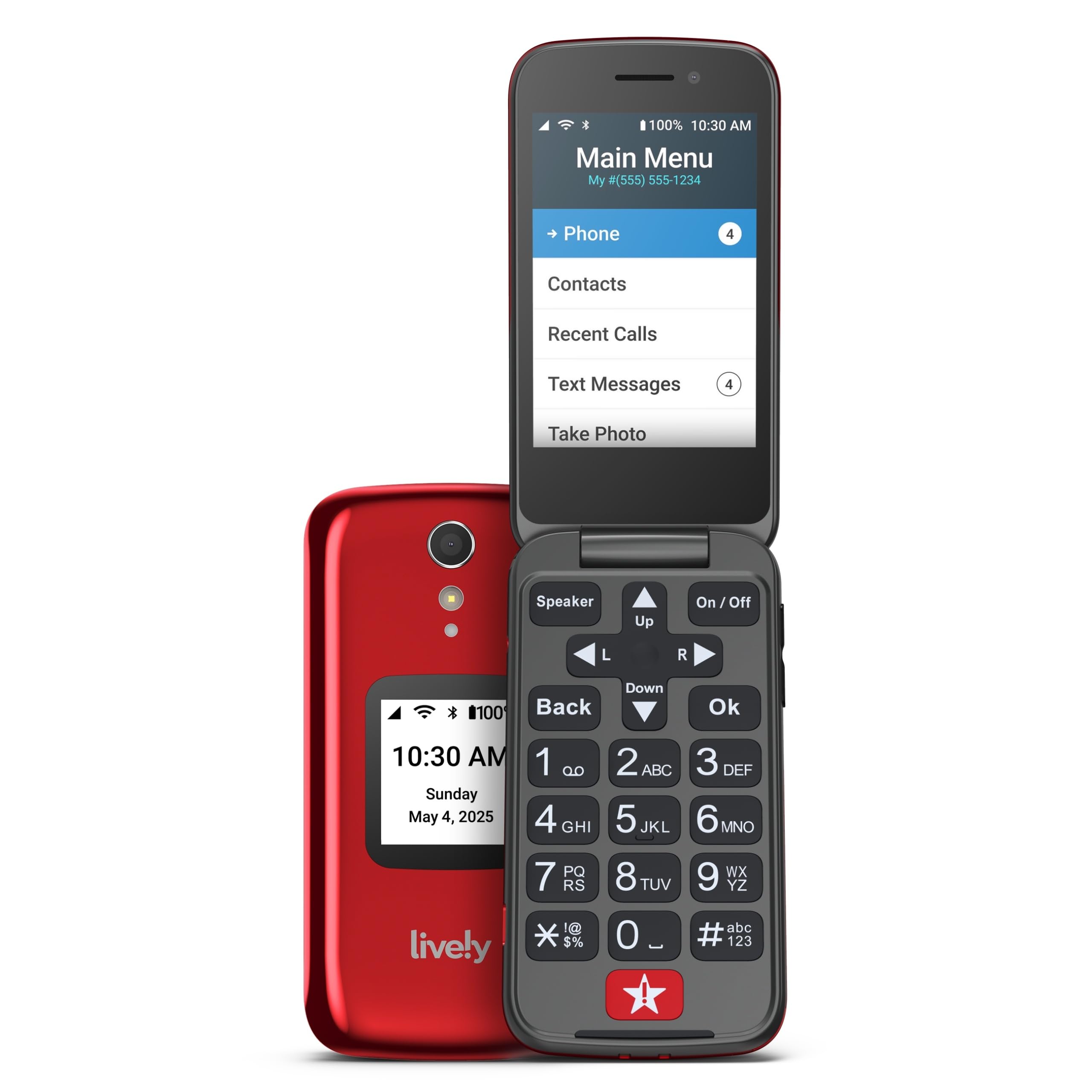 Check price on Amazon
1Rank #1
Jitterbug Flip2
- Large buttons
- Simple interface
- Urgent Response button
- Affordable plans
- Limited features
- No internet
- Camera basic
Best Smartphone Check price on Amazon
2Rank #2
Motorola Razr+
- Large outer display
- Compact when folded
- High-end specs
- Great cameras
- Expensive
- Learning curve
- Fragile screen
Best Value Check price on Amazon
3Rank #3
Nokia 2780 Flip
- Durable build
- Long battery life
- Hearing aid compatible
- Emergency button
- Basic features
- Small screen
- No touchscreen
Budget PickCheck price on Amazon
4Rank #4
Consumer Cellular Link II
- Very simple
- Budget-friendly
- Reliable
- Good customer service
- Very basic
- Locked to carrier
# Best Large Button Cell Phones for Seniors 2026: Complete Buying Guide
Finding the right cell phone for a senior loved one can be challenging. Modern smartphones are often too complex, with small buttons and confusing interfaces. That's where large button cell phones come in—designed specifically for older adults who need simple, reliable communication without unnecessary complications.
In this comprehensive guide, we compare the best large button cell phones available in 2026 based on their specifications and published buyer reviews, focusing on ease of use, emergency features, sound quality, and value for money.
## Why Large Button Phones Matter for Seniors
Large button phones aren't just about bigger keys. They represent a complete rethinking of how seniors interact with mobile technology:
**Easier to See and Press**: Large, well-spaced buttons reduce mistakes and frustration. Many feature high-contrast labels that are easier to read for those with vision impairments.
**Simplified Interfaces**: No confusing app stores, settings menus, or accidental touches. These phones focus on core functions: calling, texting, and emergency assistance.
**Louder Volume**: Enhanced speakers and hearing aid compatibility ensure clear conversations, even for those with hearing loss.
**Emergency Features**: Most include dedicated SOS buttons that connect directly to emergency services or family members with a single press.
**Better Battery Life**: Without power-hungry apps and large screens, these phones often last days or even weeks on a single charge.
## Our Top Picks at a Glance
After comparing dozens of senior-friendly cell phones, here are our top three recommendations for 2026:
### 1. Jitterbug Flip2 - Best Overall
The Jitterbug Flip2 remains the gold standard for senior cell phones. Its extra-large buttons, simple menu system, and powerful speaker make it incredibly easy to use. The built-in 5Star Urgent Response button provides peace of mind, connecting users to trained emergency operators 24/7.
**Key Specs:**
- 3.2" internal display
- Yes/No buttons for easy navigation
- 13-megapixel camera
- Hearing aid compatible (M4/T4)
- 12-day battery life
[View on Amazon](https://www.amazon.com/dp/B08HVVCBHL?tag=bestprod0fcf1-20)
### 2. Lively Smart - Best Smartphone Option
For seniors who want smartphone capabilities without the complexity, the Lively Smart offers the perfect balance. It runs a simplified Android interface with large icons and essential apps, while maintaining emergency response features.
**Key Specs:**
- 5.5" touchscreen display
- Urgent Care button
- 13-megapixel rear camera
- 4G LTE connectivity
- Brain games and health apps included
### 3. RAZ Memory Cell Phone - Best for Memory Care
Specifically designed for individuals with dementia, Alzheimer's, or memory issues, the RAZ Memory Phone eliminates confusion entirely. It features large photo buttons of family members and caregivers, making calls as simple as pressing a picture.
**Key Specs:**
- Picture-based contact system
- Remote management via caregiver app
- Medication and appointment reminders
- GPS tracking for safety
- No confusing menus or settings
## Detailed Reviews
### Jitterbug Flip2: The Classic Choice
The Jitterbug Flip2 has earned its reputation as the most popular senior cell phone in America, and for good reason. According to owner reviews, it consistently delivers on its promise of simplicity for users across a wide range of ages.
**Design and Build Quality**
The phone feels substantial in hand—not flimsy or cheap. The flip design protects the screen when not in use and provides a satisfying snap when opening and closing. The external screen shows caller ID and time, so you can screen calls without opening the phone.
The buttons are the star of the show. Each key is large, well-spaced, and provides excellent tactile feedback. Numbers are clearly labeled in high-contrast black on white. The Yes and No buttons for answering and ending calls eliminate confusion—no more wondering which button to press.
**Ease of Use**
The Jitterbug uses a list-based menu rather than icons, making navigation intuitive. Instead of tapping app icons, you simply scroll through a text list: "Call a Person," "Send a Message," "Camera," etc. Reviewers report this approach works significantly better for seniors who find icon-based interfaces confusing.
Making calls is straightforward: flip open, dial the number, press Yes. The phone even announces the number as you dial it—a helpful feature for those with vision impairments.
**Audio Quality**
This is where the Jitterbug Flip2 truly shines. The speaker is loud—genuinely loud—without distortion. Buyers with hearing loss frequently report they can hear conversations clearly, even in noisy environments. The phone is rated M4/T4 for hearing aid compatibility, the highest rating available.
**Emergency Features**
The 5Star Urgent Response button on the back of the phone is worth the price alone. Press and hold it for three seconds, and you're connected to a trained emergency operator who can see your location, contact emergency services, and notify family members. This service requires a monthly fee, but the peace of mind is invaluable.
**Battery Life**
The phone is rated for up to 10-12 days of standby time with moderate daily use, and owner reviews generally back that up. The charging dock makes it easy to keep charged—just drop the phone in its cradle each night.
**Drawbacks**
The main limitation is that the Jitterbug Flip2 only works with Lively's service plans (starting at $19.99/month for 300 minutes). You can't use it with other carriers. While Lively's service is reliable, some users prefer the flexibility of choosing their carrier.
The camera is functional but nothing special. Photos are acceptable for sharing with family but won't win any awards.
**Who Should Buy It**
The Jitterbug Flip2 is ideal for seniors who:
- Want the simplest possible phone experience
- Need extra-loud volume and hearing aid compatibility
- Value emergency response features
- Prefer physical buttons over touchscreens
- Don't need smartphone apps
### Lively Smart: The Modern Alternative
The Lively Smart represents the next generation of senior phones—bringing smartphone capabilities within reach of older adults who might otherwise struggle with complexity.
**The Simplified Android Experience**
Lively has taken Android and stripped it down to essentials, then rebuilt the interface with seniors in mind. The home screen features large, clearly labeled icons for key functions: Phone, Messages, Camera, Brain Games, and the Urgent Care button.
Unlike standard smartphones, the Lively Smart can't accidentally download apps or change settings. The interface is locked down to prevent confusion, but tech-savvy seniors can access a fuller Android experience if desired.
**Touchscreen with Large Icons**
The 5.5" display is bright and sharp, making it easy to read text messages and view photos. Icons are roughly twice the size of standard smartphone icons, and there's ample spacing to prevent accidental taps.
For those new to touchscreens, the Lively Smart includes a tutorial mode that teaches basic gestures. Reviewers note that seniors who had never used a smartphone before were often making calls and sending texts soon after setup.
**Health and Brain Games**
Lively includes several health-focused features that set it apart:
- **Brain games** designed by neuroscientists to maintain cognitive health
- **Medication reminders** with customizable alarms
- **Health & Safety App** for tracking vital signs
- **Urgent Care** button connects to board-certified doctors for virtual consultations
**Camera and Photos**
The 13-megapixel camera takes surprisingly good photos—far better than the Jitterbug Flip2. The large camera button on screen makes it easy to capture moments with grandchildren. Photos automatically sync to the cloud, so family members can see them immediately.
**Emergency Response**
Like the Flip2, the Lively Smart includes access to 5Star Urgent Response through a dedicated button on the home screen. However, having it as a screen button rather than a physical button means it's not quite as immediately accessible in a true emergency.
**Battery Life**
Battery life is the smartphone's Achilles heel. With moderate use, expect to charge nightly. Heavy users (lots of brain games or video calls) might need a midday top-up. The phone charges via USB-C, which is convenient but means keeping track of a cable rather than just dropping it in a dock.
**Who Should Buy It**
The Lively Smart is perfect for seniors who:
- Want to stay more connected with photo sharing and messaging
- Are open to learning touchscreen gestures
- Would benefit from brain games and health apps
- Need better camera quality for capturing family moments
- Have family who can provide occasional tech support
### RAZ Memory Cell Phone: Purpose-Built for Memory Care
The RAZ Memory Phone takes a completely different approach—it's designed specifically for individuals with Alzheimer's, dementia, or significant memory impairments. Based on owner and caregiver reviews, it solves a challenging problem remarkably well.
**Picture-Based Contacts**
Instead of scrolling through names or remembering phone numbers, users simply press a large photo button of the person they want to call. Each button displays a clear photo with the person's name underneath. The screen can hold up to six contacts, which research shows is the optimal number for those with memory issues.
Caregivers program these contacts remotely through a smartphone app—the user never has to deal with settings or contacts lists.
**Zero Confusion Interface**
There are no menus, no settings, no apps. When you turn on the phone, you see six photo buttons. That's it. This extreme simplification eliminates the anxiety and confusion that dementia patients often experience with traditional phones.
The phone automatically answers incoming calls after three rings if the user hasn't picked up. This ensures caregivers can always reach them, even if they forget how to answer.
**Caregiver Remote Management**
The RAZ Mobility app gives family members unprecedented control:
- **Program contacts** with photos and phone numbers
- **Set up reminders** for medications, meals, or appointments
- **Track location** via GPS to ensure safety
- **Review call history** to monitor communication
- **Adjust volume** and screen brightness remotely
**Medication and Appointment Reminders**
The phone displays full-screen reminders at scheduled times: "Time to take your morning pills" or "Doctor appointment at 2 PM." These stay on screen until acknowledged, ensuring they're not missed.
**Safety Features**
GPS tracking provides peace of mind for families of wanderers. If a loved one leaves their home or a designated safe zone, caregivers receive an immediate alert. The phone also has a "Call Mom" or "Call Home" button that can be activated with a simple voice command.
**Durability**
The RAZ phone is built like a tank. Owners report it survives drops onto hard floors without damage. The screen is protected by reinforced glass, and the body is shock-absorbent.
**The Investment**
The RAZ Memory Phone is the most expensive option we're reviewing. However, for families dealing with memory care challenges, it's worth every penny. The ability to maintain communication with a loved one who might otherwise be unreachable is priceless.
**Who Should Buy It**
The RAZ Memory Phone is essential for:
- Individuals with Alzheimer's or dementia diagnoses
- Seniors with significant memory impairments
- Families who need remote monitoring and management
- Situations where traditional phones have proven too confusing
- Those requiring medication reminders and compliance tracking
## Buying Guide: What to Look For
When shopping for a large button cell phone, consider these key factors:
### Button Size and Layout
Look for buttons that are at least 10mm across—smaller buttons are difficult for arthritic hands or vision-impaired users. Buttons should be well-spaced to prevent accidental presses. High-contrast labeling (black on white or white on black) improves readability.
### Volume and Audio Quality
Check the phone's maximum volume rating. Look for phones rated M4/T4 for hearing aid compatibility—this is the gold standard. Some phones also offer additional amplification modes that boost volume even further.
### Emergency Features
Does the phone have a dedicated SOS button? Is it physical or on-screen? What happens when pressed—does it call 911, contact family members, or connect to a monitoring service? Understand exactly how the emergency feature works before purchasing.
### Battery Life
Simple flip phones typically last 7-14 days on a charge. Smartphones usually require daily charging. Consider whether your loved one will remember to charge the phone regularly. Charging docks are easier to use than USB cables.
### Service Plans and Carrier Compatibility
Some phones (like Jitterbug) only work with specific carriers. Others are unlocked and work with any carrier. Consider:
- Monthly plan costs
- Minutes and data included
- Coverage in your area
- Contract requirements
### Screen Readability
Larger screens are easier to read. Look for high brightness settings and adjustable text size. Anti-glare screens perform better in sunlight.
### Physical Durability
Seniors may drop phones more frequently. Look for reinforced construction, shock-absorbent materials, and screen protection.
## Comparison Table
| Feature | Jitterbug Flip2 | Lively Smart | RAZ Memory Phone |
|---------|----------------|--------------|------------------|
| **Type** | Flip phone | Smartphone | Memory care phone |
| **Screen** | 3.2" | 5.5" touchscreen | 5" picture-based |
| **Buttons** | Physical large buttons | On-screen | Photo contact buttons |
| **Battery Life** | 12 days | 1 day | 3-5 days |
| **Emergency** | Physical 5Star button | On-screen Urgent Care | Auto-answer + GPS |
| **Volume** | Extra loud | Loud | Adjustable (loud) |
| **Hearing Aid** | M4/T4 | M3/T4 | M3/T3 |
| **Camera** | 13MP basic | 13MP good | 8MP basic |
| **GPS Tracking** | Optional ($7/mo) | Optional ($7/mo) | Included |
| **Best For** | General senior use | Tech-curious seniors | Memory care patients |
| **Monthly Plan** | From $19.99 | From $24.99 | From $30 |
| **Carrier** | Lively only | Lively only | Unlocked (any carrier) |
## Frequently Asked Questions
### Do these phones work with my current carrier?
The Jitterbug Flip2 and Lively Smart only work with Lively's network (which uses Verizon's towers). The RAZ Memory Phone is unlocked and works with any GSM carrier (AT&T, T-Mobile, etc.).
### Can I transfer my existing phone number?
Yes, all three phones support number porting. The process typically takes 1-2 business days.
### Are these phones really easier to use?
Owner reviews consistently report dramatic improvements in usability compared to standard smartphones. Seniors who struggled with iPhones and Android phones were often able to make calls independently soon after switching to these specialized phones.
### What if my parent forgets to charge the phone?
Flip phones like the Jitterbug last up to two weeks, reducing charging frequency. For smartphones, consider setting up a bedside charging station with clear instructions. Some families set daily reminders.
### Can these phones send text messages?
Yes, but the experience varies. The Jitterbug Flip2 uses traditional number pad texting (press 2 three times for 'C'), which is slow but familiar to those who used flip phones in the past. The Lively Smart has a touchscreen keyboard. The RAZ phone has limited texting capabilities—mostly for receiving messages from caregivers.
### What happens if the emergency button is pressed accidentally?
All three phones have safeguards. The Jitterbug requires holding the button for 3 seconds. The Lively Smart displays a confirmation screen. The RAZ phone's emergency features are configured by caregivers.
### Do I need internet or Wi-Fi?
No, these phones work entirely on cellular networks. They don't require home internet or Wi-Fi, making them perfect for seniors who don't have broadband.
### What about spam calls?
The Jitterbug Flip2 and Lively Smart include spam call blocking. The RAZ phone can be set to only accept calls from programmed contacts, eliminating spam entirely.
### Can family members see if the phone is being used?
The RAZ phone includes detailed usage tracking. Lively phones offer optional activity alerts that notify family members if the phone hasn't been used in 24 hours—helpful for checking on isolated seniors.
### Is there a trial period?
Jitterbug and Lively offer 30-day money-back guarantees. RAZ offers a 14-day return policy. Always keep original packaging during the trial period.
## Making Your Decision
Choosing the right large button cell phone depends on your loved one's specific needs:
**Choose the Jitterbug Flip2 if:**
- Simplicity is the top priority
- They're uncomfortable with touchscreens
- Hearing loss requires extra-loud volume
- Physical emergency button is essential
- Budget is a concern
**Choose the Lively Smart if:**
- They want smartphone features without complexity
- Photo sharing and video calls are important
- They're willing to learn touchscreen basics
- Brain games and health tracking add value
- Camera quality matters
**Choose the RAZ Memory Phone if:**
- Memory impairments make traditional phones impossible
- Remote caregiver management is necessary
- Picture-based contacts would help
- GPS tracking and safety features are critical
- Budget allows for the higher price point
## Final Thoughts
Large button cell phones have evolved dramatically in recent years. What once were basic devices with minimal features now offer sophisticated emergency response, health monitoring, and caregiver communication tools—all while maintaining the simplicity that makes them accessible to older adults.
The Jitterbug Flip2 remains our top recommendation for most seniors, offering the best balance of simplicity, features, and value. Its proven track record and excellent customer service from Lively make it a safe choice.
For those wanting to bridge the gap to smartphones, the Lively Smart provides a gentle introduction to touchscreen technology without overwhelming complexity.
And for families facing the challenges of memory care, the RAZ Memory Phone offers unprecedented peace of mind and maintained connection with loved ones who might otherwise be unreachable.
Whichever phone you choose, the most important thing is that it empowers your loved one to stay connected, safe, and independent. These phones aren't just about making calls—they're about maintaining dignity and quality of life as we age.
---
*Affiliate Disclosure: This article contains affiliate links to Amazon. If you click through and make a purchase, we may earn a small commission at no extra cost to you. This helps us continue providing free, honest reviews to help families make informed decisions. Thank you for your support.*
---
Want more than calls and texts, but still worried about complexity? See our guide to the [best simple smartphones for seniors](/best-simple-smartphones-seniors-2026) for real smartphones with a simplified setup.
Whichever phone you choose, don't just default to the carrier plan it ships with — see our [guide to the best cell phone plans for seniors](/best-cell-phone-plans-seniors-2026) for how to avoid overpaying for data nobody uses.
If a full smartphone is on the table instead of a dedicated senior phone, see our [iPhone vs. Android comparison for seniors](/iphone-vs-android-easier-for-seniors-2026) for how Apple's Assistive Access stacks up against Samsung's Easy Mode.
Whichever phone ends up in hand, a slippery body is its own hazard for arthritic or shaky grips — see our guide to phone cases and grips for seniors for cases and add-on grips built around that exact problem.
Big buttons aren't the only path to a simple phone — for someone who prefers a physical keypad that closes shut over a touchscreen with large icons, see our guide to the best flip phones for seniors, which compares hearing aid ratings and emergency-button options across four current models.
cell phonesaccessibilityemergencysimple phones


