Best Monitor Arms for Seniors (2026): OSHA Screen Height, Bifocals, and Set-and-Forget Mounts
Ergotron LX, Amazon Basics, HUANUO FlowLift, a VIVO pole mount and a WALI riser compared for weight range, desk fit and height, using OSHA's monitor placement and bifocal guidance. Updated October 19, 2026. No invented prices or medical claims.
As an Amazon Associate I earn from qualifying purchases. We independently review products; buying through our links never costs you extra.
Sturdiest for Heavier Monitors
Ergotron LX Single Monitor Arm (Matte Black)
Quick picks
| Product | Best for | Amazon |
|---|---|---|
| Ergotron LX Single Monitor Arm (Matte Black) | Sturdiest for Heavier Monitors | Check price on Amazon |
| Amazon Basics Gas Spring Single Monitor Arm | Budget Arm for Lighter Monitors | Check price on Amazon |
| HUANUO FlowLift Single Monitor Mount | Widest Weight Range Gas Arm | Check price on Amazon |
| VIVO STAND-V001C Single Monitor Desk Mount (Pole) | Set-Once Pole Mount | Check price on Amazon |
| WALI STT003 Adjustable Monitor Riser | No-Clamp, No-VESA Option | Check price on Amazon |

Our Top Picks
Chosen for seniors based on features, specs, and verified buyer reviews.

Ergotron LX Single Monitor Arm (Matte Black)
- Fits up to 34 in, 7–25 lb (listing)
- 13 in of lift; up to 17.3 in above desk
- Clamp (0.4–2.4 in) and grommet mounts included
- 10-year warranty stated on listing
- 7 lb minimum: very light monitors may not hold position
- Clamp range tops out at 2.4 in desks

Amazon Basics Gas Spring Single Monitor Arm
- 15–27 in, 4.4–15.4 lb (listing)
- Extends up to 20.5 in
- Clamp/grommet for 0.39–4 in desks
- Tilt −90° to +85°, 360° rotation
- Listing says tension must be set to the monitor's weight or it drifts or sags
- Joints stiff out of the box per listing

HUANUO FlowLift Single Monitor Mount
- 13–32 in, 4.4–19.8 lb (listing)
- Lifts up to 39.6 cm (~15.6 in)
- One-piece design; clamp or grommet 0.59–3.54 in
- Tilt −50° to +85°
- Listing recommends wood tabletops with no beams under the clamp
- Durability figure is HUANUO's claim
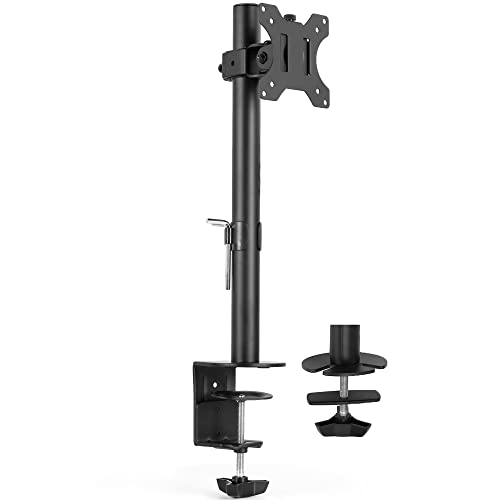
VIVO STAND-V001C Single Monitor Desk Mount (Pole)
- 13–38 in, up to 17.6 lb (listing)
- Height set on center pole: no gas spring to drift
- Clamp up to 3.25 in; grommet up to 3 in
- Portrait or landscape
- Height changes need a loosen-and-retighten, not one hand
- Less reach forward and back than a gas arm

WALI STT003 Adjustable Monitor Riser
- 3.9, 4.7 or 5.5 in lift (listing)
- 14.6 x 9.3 in metal shelf, up to 44 lb
- No VESA holes or clamp needed
- Keyboard storage underneath
- Only adds height: can't move the screen closer, farther or sideways
- Fixed steps, not continuous height
Updated October 19, 2026. Short answer: a monitor arm is only useful if it puts the screen where OSHA says it should go and then stays there. Aim for the top of the screen at or slightly below eye level, 20 to 40 inches away, and lower than that if you wear bifocals or progressives. For heavier monitors (7 to 25 lb) or frequent repositioning, the Ergotron LX is the sturdiest arm we checked and lists a 10-year warranty. For a lighter 15 to 27 inch monitor, the Amazon Basics gas spring arm is the budget pick. The HUANUO FlowLift covers a wider weight range (4.4 to 19.8 lb). If you don't want to adjust gas-spring tension at all, a VIVO pole mount or a simple WALI riser is easier to live with. This guide uses OSHA's computer workstation eTool and features from live Amazon listings checked October 19, 2026. We didn't invent prices, ratings or test results, and this page makes no medical claims.
Where the screen should go (OSHA's numbers)
OSHA's computer workstation eTool gives specific placement targets. A screen that's too high or too low makes you work with your head, neck, shoulders and even back in awkward postures, and holding those postures tires the muscles that support your head. Its guidance:
- Height: the top of the monitor at or slightly below eye level, with the center of the screen about 15 to 20 degrees below horizontal eye level.
- Distance: generally 20 to 40 inches from your eyes to the screen. If small text forces you to lean in, increase the text size rather than pulling the monitor to the edge of the desk.
- Straight ahead: directly in front of you, and never more than 35 degrees to the left or right.
- Tilt: roughly perpendicular to your line of sight, usually tilted back no more than 10 to 20 degrees. Watch for glare from ceiling lights.
- Windows: place the monitor perpendicular to a window, not facing it or with it behind you.
The bifocal problem, and why it matters for older eyes
OSHA calls out bifocal users specifically. Because bifocal (and many progressive-lens) wearers read through the bottom part of their lenses, a monitor set at the usual height makes them tilt their head back to read it, which has the same effect as a monitor that's too high. OSHA's suggestions are to lower the monitor below the usual recommendation and tilt the screen up toward you, raise the chair until you can read without tipping your head back (which may mean raising the keyboard and adding a footrest), or use single-vision glasses made for computer distance.
That's the main reason we prefer an arm or a pole mount for many seniors over a fixed stand: you can drop the screen an inch or two lower than a younger family member would set it, then leave it there. If several people share the computer, an arm also lets each person adjust it, but only if they can manage the adjustment, which is the next issue.
How we chose
- Weight and size range published on the listing, so you can match the arm to your actual monitor. An arm rated above your monitor's weight drifts up, and one rated below it sags.
- VESA 75 x 75 or 100 x 100 mm, the two patterns most home monitors use. The riser needs no VESA mount.
- Desk fit: listed clamp and grommet thickness ranges.
- Height range: enough lift to reach eye level, and enough drop for bifocal users.
- How it holds position: gas spring (moves with one hand, needs tension set to the monitor's weight) versus a mechanical pole (set once with a knob or bolt, doesn't drift).
- Warranty language when the listing states it.
- Features we could verify on live Amazon listings, pulled through Amazon's Creators API on October 19, 2026. No invented scores or medical claims.
Comparison table
| Pick | Type | Monitor range (listing) | Height / reach (listing) | Desk fit (listing) | Best for |
|---|---|---|---|---|---|
| Ergotron LX (B07Q8TJ2KL) | Gas-spring arm | Up to 34 in; 7–25 lb | 13 in of lift; up to 17.3 in above desk; 75° tilt, 360° rotation | Clamp 0.4–2.4 in; grommet up to 2.25 in | Heavier monitors; frequent repositioning; long warranty (10 years) |
| Amazon Basics gas spring single (B0CQXMT3QC) | Gas-spring arm | 15–27 in; 4.4–15.4 lb | Extends up to 20.5 in; tilt −90° to +85°; swivel ±90° | Clamp/grommet 0.39–4 in | Lighter monitors on a budget |
| HUANUO FlowLift single (B07T3KCQ94) | Gas-spring arm | 13–32 in; 4.4–19.8 lb | Lifts up to 39.6 cm (about 15.6 in) from desk; tilt −50° to +85° | Clamp/grommet 0.59–3.54 in | Wider weight range; one-piece install |
| VIVO STAND-V001C (B01CUU2VKY) | Pole mount (no gas spring) | 13–38 in; up to 17.6 lb | Height set along center pole; ±45° tilt, 360° rotation | Clamp up to 3.25 in; grommet up to 3 in | Set once and leave; no drifting |
| WALI STT003 riser (B094QTGHNZ) | Desk riser (not an arm) | Shelf 14.6 x 9.3 in; up to 44 lb | 3.9, 4.7 or 5.5 in lift | Sits on the desk; no clamp | No VESA holes, no clamp surface, no adjusting |
Prices are left off on purpose. Use the Amazon buttons for today's price. Affiliate tag: bestproducts20d-20.
The five picks
1. Ergotron LX: sturdiest arm for heavier monitors
The Ergotron LX listing covers single screens up to 34 inches and 7 to 25 pounds on VESA 75 x 75 or 100 x 100 mm, with 13 inches of lift that puts the monitor up to 17.3 inches above the work surface, 360 degrees of rotation and 75 degrees of tilt. It comes with a two-piece desk clamp (desks 0.4 to 2.4 inches thick) and a grommet mount (up to 2.25 inches), built-in cable management, and a stated 10-year warranty. Note the 7 lb minimum: a very light monitor may not stay put on it. Choose it when the monitor is mid-size or heavy, or when the person using it will move the screen between a chair and a standing position.
2. Amazon Basics Gas Spring Single Monitor Arm: budget arm for lighter monitors
The Amazon Basics listing covers 15 to 27 inch monitors weighing 4.4 to 15.4 pounds on VESA 75 x 75 or 100 x 100 mm, with tilt from −90 to +85 degrees, ±90 degrees of swivel, 360-degree rotation, and extension up to 20.5 inches. It includes a C-clamp and grommet for desks 0.39 to 4 inches thick. The listing is unusually candid: joints may feel stiff out of the box, and you have to set the gas-spring tension to your monitor's weight or it will drift or sag. Plan for a family member to do that first setup. Choose it for a typical 22 to 27 inch home monitor.
Check price on AmazonAmazon Basics Gas Spring Single Monitor Arm
3. HUANUO FlowLift Single Monitor Mount: wider weight range, one-piece install
HUANUO's FlowLift listing covers 13 to 32 inch monitors and 4.4 to 19.8 pounds on VESA 75 x 75 or 100 x 100 mm, with tilt from −50 to +85 degrees, ±90 degrees of swivel, 360-degree rotation, and lift up to 39.6 cm (about 15.6 inches) above the desk. It uses a one-piece design with C-clamp or grommet mounting for tabletops 0.59 to 3.54 inches thick. The listing recommends a wood tabletop with no beams or panels under the clamp area, and describes a three-step install where step three is setting the tension. HUANUO says the arm passed 20,000 motion tests; that's the brand's claim, not something we measured. Choose it if your monitor falls between the Amazon Basics and Ergotron weight ranges.
Check price on AmazonHUANUO FlowLift Single Monitor Mount
4. VIVO STAND-V001C: pole mount you set once
The VIVO STAND-V001C listing covers one 13 to 38 inch screen up to 17.6 pounds on VESA 75 x 75 or 100 x 100 mm. Instead of a gas spring, the mount slides to the height you want along a center pole, then offers +45 to −45 degrees of tilt, 90 degrees of swivel and 360-degree rotation, including portrait orientation. It clamps to surfaces up to 3.25 inches thick or uses an optional grommet (up to 3 inches), and has integrated cable management. For someone who wants the screen at one bifocal-friendly height and never wants it to drift, a pole mount is the simplest arm-style option. The trade-off is that changing the height takes a tool or a firm loosen-and-retighten, not a one-hand push.
Check price on AmazonVIVO STAND-V001C Single Monitor Desk Mount (Pole)
5. WALI STT003 monitor riser: no arm at all
The WALI STT003 listing describes a 14.6 x 9.3 inch metal shelf rated up to 44 pounds that lifts a monitor, laptop or printer to 3.9, 4.7 or 5.5 inches off the desk, with rubber pads, vent holes and open storage underneath for a keyboard. Choose it when the monitor has no VESA holes, the desk can't take a clamp (glass, a thin edge, a drawer in the way), or the person using it simply doesn't want anything to adjust. It only adds height, so the monitor's own stand has to already sit at a good distance.
Check price on AmazonWALI STT003 Adjustable Monitor Riser
Installation and safety checklist
- Weigh the monitor first (a bathroom scale works: weigh yourself holding it, then subtract). Check the label on the back for the VESA pattern.
- Look under the desk before ordering. Clamps need a solid, flat edge free of drawers, lips and crossbars.
- Have a second person help lift the monitor onto the VESA plate. Gas-spring arms can spring up when there's no weight on them, so follow the manual's tension steps in order.
- Set it, then sit back. Check the OSHA targets from your normal seated position: top of the screen at or below eye level, arm's length or a bit more away, centered in front of you.
- Bifocal check: if you tip your chin up to read the bottom of the screen, lower the screen or tilt it up toward you.
- Route the cables through the arm's cable management so nothing dangles where it can catch a sleeve or a cane.
Who should skip a monitor arm
If the computer is a laptop, a laptop stand plus a separate keyboard and mouse does the same job for less. If the screen is a tablet used in a chair or bed, see our tablet stands and mounts guide. And if text is still hard to read once the screen is at the right height and distance, turn up the display scaling or text size before you buy more hardware. OSHA itself notes that text size may need to be increased on smaller monitors. If neck pain, headaches or vision changes are why you're shopping, treat the arm as one comfort change and talk to a clinician. This page isn't medical advice.
Finish the desk setup
A well-placed screen works best with a keyboard and pointer you can use comfortably. See our guides to large-key and large-print keyboards and trackball mice.
FAQ
What is the best monitor arm for seniors?
Pick the arm that matches your monitor's weight and VESA pattern and that you can set once and leave. For a heavier monitor, or one you'll reposition often, the Ergotron LX (7 to 25 lb, 10-year warranty on the listing) is the sturdiest pick we checked. For a lighter 15 to 27 inch monitor on a budget, the Amazon Basics gas spring arm (4.4 to 15.4 lb) fits. If you'd rather never adjust gas-spring tension, a pole mount like the VIVO STAND-V001C or a simple riser like the WALI STT003 is easier.
How high should a computer monitor be for an older adult?
OSHA's computer workstation guidance says the top of the screen should be at or slightly below eye level, with the center of the screen about 15 to 20 degrees below horizontal eye level, and the screen 20 to 40 inches from your eyes. If you wear bifocals or progressives, OSHA says to lower the monitor below that so you don't tilt your head back to read through the bottom of your lenses.
Will a monitor arm fit my monitor?
Check three things: the VESA hole pattern on the back of the monitor (all five picks here list 75 x 75 mm or 100 x 100 mm, and the riser needs none), the monitor's weight including any speakers, and the screen size. If your monitor has no VESA holes, you'll need an adapter or a riser instead of an arm.
Will a monitor arm clamp to my desk?
Measure the desktop's thickness and check underneath for a lip, drawer or crossbar where the clamp would go. Listed clamp ranges: Ergotron LX 0.4 to 2.4 in, Amazon Basics 0.39 to 4 in, HUANUO FlowLift 0.59 to 3.54 in, VIVO STAND-V001C up to 3.25 in. Glass, particleboard edges and thin hutches are poor clamp surfaces.
Is a monitor riser as good as a monitor arm?
For many seniors, yes. A riser like the WALI STT003 lifts the screen 3.9, 4.7 or 5.5 inches with no clamping, no VESA screws and nothing to drift. It can't move the screen closer, farther or sideways, so it works best when the monitor's own stand already sits at the right distance.
Why don't you list prices?
Amazon prices change often. We checked listing features on October 19, 2026 and left prices off so the page doesn't go stale. Use the buttons for today's price.
Sources
- OSHA, Computer Workstations eTool, "Workstation Components: Monitors" (screen height, distance, angle, tilt, bifocal guidance): https://www.osha.gov/etools/computer-workstations/components/monitors
- Amazon product listings for the Ergotron LX (B07Q8TJ2KL), Amazon Basics Gas Spring Single Monitor Arm (B0CQXMT3QC), HUANUO FlowLift (B07T3KCQ94), VIVO STAND-V001C (B01CUU2VKY) and WALI STT003 (B094QTGHNZ), features pulled via Amazon's Creators API on October 19, 2026 (linked from the buttons below)
