Best Trackball and Ergonomic Mice for Seniors (2026)
Trackballs and vertical mice cut arm travel on small desks and recliner trays. Four Amazon picks compared by control style and listing features — Logitech Ergo M575, Kensington Expert (wireless and wired), and an Anker vertical mouse. Updated October 14, 2026. No medical claims; no invented prices.
As an Amazon Associate I earn from qualifying purchases. We independently review products; buying through our links never costs you extra.
Best Overall
Logitech Ergo M575 / M575S Wireless Trackball
Quick picks
| Product | Best for | Amazon |
|---|---|---|
| Logitech Ergo M575 / M575S Wireless Trackball | Overall | Check price on Amazon |
| Kensington Expert Wireless Trackball (K72359WW) | Large Ball | Check price on Amazon |
| Kensington Expert Wired Trackball (K64325) | Plug-and-Play | Check price on Amazon |
| Anker 2.4G Wireless Vertical Ergonomic Mouse | Vertical Alternative | Check price on Amazon |

Our Top Picks
Chosen for seniors based on features, specs, and verified buyer reviews.

Logitech Ergo M575 / M575S Wireless Trackball
- Thumb trackball keeps the hand planted on small desks
- Listing cites ergonomic shape and reduced forearm muscle activity vs a regular mouse
- Bluetooth and USB receiver options on common kits
- Quiet-click M575S variants available
- Thumb control takes a short learning curve
- Optional Logi software needed for deepest customization

Kensington Expert Wireless Trackball (K72359WW)
- Large 55mm ball with scroll ring
- Detachable wrist rest; ambidextrous design
- Bluetooth LE or 2.4 GHz USB dongle
- Customizable buttons via Kensington software on supported OS
- Larger footprint than a thumb trackball
- Full customization depends on supported OS/software
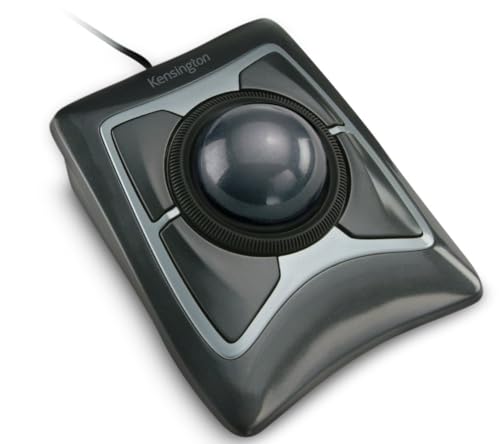
Kensington Expert Wired Trackball (K64325)
- Same large-ball control without batteries
- USB-A cable — no pairing step
- Detachable wrist rest
- Good when wireless is unwanted
- Cable reach limits recliner setups
- Software customization has OS limits per listing

Anker 2.4G Wireless Vertical Ergonomic Mouse
- Handshake posture without learning a trackball
- 800/1200/1600 DPI steps on the listing
- USB receiver; sleeps after inactivity
- Budget-friendly entry point
- Still needs desk space to move the whole mouse
- Right-hand design; batteries often sold separately
Updated October 14, 2026. A standard mouse makes your whole arm do the work. A trackball or vertical mouse keeps the hand mostly still and moves the cursor with the thumb or fingers instead — which is why these devices show up in ergonomic recommendations for people who feel wrist or forearm fatigue after long computer sessions. This guide compares four current Amazon options using manufacturer listing features (no invented prices or medical claims). Category: daily living / computer comfort for seniors — not a treatment for any diagnosis.
Who this guide is for
This page is for older adults and caregivers who notice hand, wrist, or forearm fatigue after email, video calls, or online banking sessions — and for anyone working from a recliner tray or small laptop desk where a regular mouse has nowhere to swipe. It is not medical advice and it does not claim to treat arthritis, carpal tunnel syndrome, or tremor. If pain is severe or sudden, talk with a clinician; device geometry is only one comfort lever alongside breaks, chair height, and screen distance.
Desk and recliner setups that change the pick
On a full desk with a mouse pad, either a thumb trackball or a vertical mouse can work. On a narrow recliner tray, a trackball wins because the device stays planted — you are not chasing a mouse onto the carpet. If the senior shares a computer with a younger relative who refuses a trackball, a vertical mouse is often the compromise that both people will leave plugged in.
For tablets, a mouse is optional; start with our tablets guides if the real problem is the whole device. For smartphones with tiny targets, a large-button phone or simplified smartphone may matter more than any desktop peripheral.
Accessibility settings to change on day one
- Lower pointer speed in Windows Settings → Bluetooth & devices → Mouse, or macOS System Settings → Mouse.
- Enable ClickLock or similar if holding buttons is hard.
- Increase cursor size so the pointer is visible on glossy screens.
- On Logitech devices, only install optional software if you need button remaps — basic clicking works without it.
How we chose
We looked for: (1) a published ergonomic design claim from the manufacturer, (2) wireless options that do not require constant desk space to swipe a mouse, (3) buttons that are easy to feel, and (4) connectivity that works on common Windows and Mac setups. Features below come from Amazon Creators API listing text checked October 14, 2026. We do not invent DPI comfort scores or clinical outcomes.
Selection criteria
- Hand stays mostly planted (trackball) or in a handshake posture (vertical mouse)
- Wireless connection with a clear setup path (Bluetooth and/or USB receiver)
- Manufacturer ergonomic or strain-reduction claim you can read on the listing
- Battery or power behavior that will not surprise a less technical user
- Ambidextrous or clearly labeled right-hand design so you know what you are buying
Trackball vs vertical mouse vs regular mouse
| Type | How the cursor moves | Best when | Watch-outs |
|---|---|---|---|
| Thumb trackball (e.g. Logitech Ergo M575) | Thumb rolls the ball; hand stays put | Small desks, laptop trays, recliner side tables | Thumb needs a few days to adapt |
| Finger trackball (e.g. Kensington Expert) | Fingers roll a large ball; wrist rest often included | Precision work, users who dislike thumb balls | Larger footprint; software for full customization |
| Vertical / "handshake" mouse | Whole device moves like a mouse, hand is rotated | Users who want a familiar swipe motion with less pronation | Still needs desk space to move |
| Standard flat mouse | Arm and wrist do most travel | Occasional use | Long sessions are where discomfort often shows up |
The four picks
1. Logitech Ergo M575 / M575S — best everyday thumb trackball
Logitech’s Ergo M575 family is built around thumb control and a sculpted shape. Listing claims include reduced forearm muscle activity versus a regular mouse (Logitech cites lab measurements on the listing), US Ergonomics certification language on some variants, Bluetooth plus a Logi Bolt / USB receiver option, and long battery life with an included AA cell on many kits. The M575S quiet-click variants are useful in shared living rooms. This is the default recommendation for most seniors who want less arm travel on a laptop tray.
Check price on AmazonLogitech Ergo M575 / M575S Wireless Trackball
2. Kensington Expert Wireless Trackball — best large-ball finger control
The Kensington Expert Wireless (K72359WW) listing highlights a large 55mm ball, Diamond Eye optical tracking, a patented scroll ring, a detachable wrist rest, ambidextrous layout, and wireless connection via Bluetooth LE or a 2.4 GHz USB dongle. Choose this when thumb trackballs feel fiddly and a bigger ball with a wrist rest feels more natural.
Check price on AmazonKensington Expert Wireless Trackball (K72359WW)
3. Kensington Expert Wired Trackball — best simple plug-and-play
The wired Expert Trackball (K64325) keeps the same large-ball idea with a USB-A cable — useful when wireless pairing is a non-starter or batteries are a hassle. Listing notes ChromeOS customization limits and Windows/Mac software expectations; for basic pointer use the wired connection is enough.
Check price on AmazonKensington Expert Wired Trackball (K64325)
4. Anker 2.4G Wireless Vertical Mouse — best budget handshake-grip alternative
If someone rejects trackballs after a fair try, a vertical mouse keeps a more familiar “move the whole mouse” habit while rotating the hand into a handshake posture. Anker’s listing describes 800/1200/1600 DPI steps, a USB receiver (not Bluetooth on this model), next/previous buttons, and an 8-minute sleep timer. Batteries are typically separate (2×AAA). Right-hand oriented.
Check price on AmazonAnker 2.4G Wireless Vertical Ergonomic Mouse
Comparison table
| Model | Control style | Connection | Standout listing claim | Best for |
|---|---|---|---|---|
| Logitech Ergo M575 / M575S | Thumb trackball | Bluetooth + receiver options | Ergonomic shape; less forearm muscle activity claim | Most seniors on laptops |
| Kensington Expert Wireless | Finger trackball + scroll ring | Bluetooth LE or USB dongle | 55mm ball; wrist rest; ambidextrous | Users who want a large ball |
| Kensington Expert Wired | Finger trackball | USB-A cable | Same large-ball design, no batteries | Simplest setup |
| Anker vertical wireless | Vertical mouse | 2.4 GHz USB receiver | Handshake posture; adjustable DPI | Trackball skeptics |
Prices are omitted on purpose — use the Amazon buttons for today’s offer. Affiliate tag: bestproducts20d-20.
Setup tips that prevent returns
- Give a trackball three short sessions before deciding it is “impossible.” The thumb learning curve is real and usually short.
- Turn cursor speed down at first in system settings; trackballs feel fast if the OS pointer speed is still set for a regular mouse.
- On dual-computer households, prefer models with easy Bluetooth multi-device switching or keep the USB receiver on a brightly colored tether so it does not vanish into a laptop bag.
- Clean the ball and the well with a dry cloth monthly — grit is the main reason trackballs suddenly feel “stuck.”
When not to buy a trackball
If the computer is used five minutes a day for a single website, a simple large-button mouse or the laptop trackpad may be enough. If hand tremor is severe, try before you buy (many big-box stores stock Logitech trackballs) — some people find a larger Kensington ball easier, others prefer a vertical mouse. We are not diagnosing tremor or arthritis; we are matching device geometry to desk habits.
Related Senior Tech Review guides
See also best tablets for seniors, tablets with keyboards, and large-button cell phones when the bigger problem is the whole device, not just the pointer.
FAQ
What is the best mouse for seniors with wrist discomfort?
There is no single medical “best.” Many people who want less arm travel do well with a thumb trackball like the Logitech Ergo M575; others prefer a large finger trackball (Kensington Expert) or a vertical handshake mouse (Anker). Match the control style to what feels controllable after a few days, not to marketing badges alone.
Are trackballs hard to learn?
They feel odd for a session or two. Lower the pointer speed, practice clicking without moving the whole arm, and give it three short tries before returning the device.
Do I need special software?
Basic pointing works without software on most systems. Logitech and Kensington offer optional apps for button remapping and speed — useful, not required for simple browsing.
Will a trackball work on a recliner tray?
Yes — that is one of the main reasons to pick a trackball. Because the device does not need to swipe across the tray, it stays put on small surfaces.
Why are prices missing?
Amazon prices change. Features above were checked via listings on October 14, 2026; tap through for the live price.


