Best Medical Alert Systems With No Monthly Fee (2026)
Most medical alert systems bill monthly because a live 24/7 monitoring center is a real, ongoing operating cost. A small number of devices skip that by routing an SOS press straight to family or 911 instead — no call center, no bill. Here's how that tradeoff actually works, and which no-fee devices are worth buying.
As an Amazon Associate I earn from qualifying purchases. We independently review products; buying through our links never costs you extra.
Most Affordable
Silent Beacon 2.0
Quick picks
| Product | Best for | Amazon |
|---|---|---|
| Silent Beacon 2.0 | Most Affordable | Check price on Amazon |
| LogicMark Guardian Alert 911 Plus | Leaving the House | Check price on Amazon |
| Shelvas Zero | Automatic Fall Detection | Check price on Amazon |

Our Top Picks
Chosen for seniors based on features, specs, and verified buyer reviews.

Silent Beacon 2.0
- One-time purchase, no subscription
- Calls 911 or a contact list with GPS location in one press
- Loud audible alarm can deter a threat
- Requires a paired cell phone nearby and charged
- Not a fully standalone cellular device
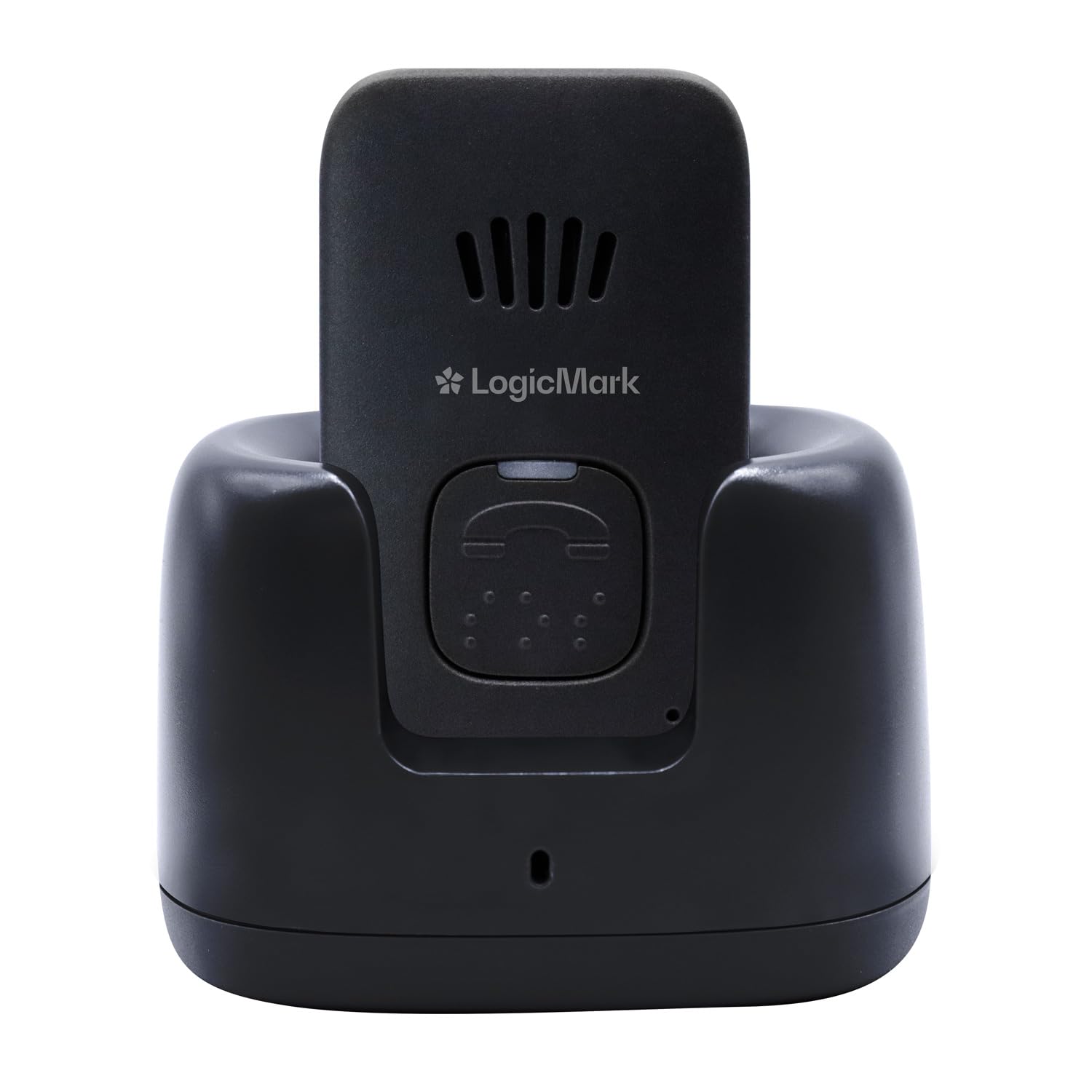
LogicMark Guardian Alert 911 Plus
- Built-in 4G LTE — no paired phone required
- One-time purchase, no mandatory monthly service
- Works away from home, not just indoors
- Higher upfront cost than Bluetooth-paired options
- No live monitoring center to triage the situation
Shelvas Zero
- AI-based automatic fall detection with no subscription
- Live GPS with no SIM card or monthly cost
- Helps when the wearer can't press a button
- Automatic fall detection can occasionally miss or false-trigger
- Newer product with a shorter track record than established brands
The Short Answer
For a budget-first option, the Silent Beacon 2.0 is a one-time purchase that pairs with a cell phone and calls 911 or chosen contacts with one press. For a device that works away from home without needing a paired phone nearby, the LogicMark Guardian Alert 911 Plus uses its own 4G cellular connection with no monthly service bill. For automatic fall detection without a subscription, the Shelvas Zero adds AI-based fall detection and GPS with no SIM card or recurring cost.
What "No Monthly Fee" Actually Means
Traditional medical alert brands — Medical Guardian, MobileHelp, Bay Alarm Medical, and similar — route a button press to a live monitoring center staffed around the clock, where an operator talks to the person, assesses the situation, and calls 911 or a family contact if needed. That live response is genuinely valuable in a real emergency, and it's also why those services bill $25-$45 a month: someone is on the other end of that call at 3 a.m., every night, for every subscriber. Our guide to monitored medical alert systems covers those subscription options in detail.
No-monthly-fee devices skip the monitoring center entirely. Pressing the button either calls 911 directly, calls a pre-programmed list of family members, or does both — there's no trained operator assessing the situation first. That's the real tradeoff: lower cost, but no human deciding whether the situation actually needs an ambulance versus a phone call to a neighbor.
Who This Actually Fits
A no-fee device makes the most sense for someone who is reasonably independent, has family or friends who can realistically answer a call quickly, and mainly wants a fast way to summon help rather than ongoing passive monitoring. It's a weaker fit for someone who lives alone with no nearby family, has a condition where seconds matter (a cardiac history, for instance), or would benefit from an operator who stays on the line talking them through a fall until help arrives — that's specifically what a monitored service is built for.
Our Picks
Silent Beacon 2.0 — Most Affordable
A wearable panic button that pairs over Bluetooth with a cell phone already in the house. One press can call 911, text and call a list of emergency contacts with a GPS location, and sound a loud audible alarm to deter a threat or draw attention. Because it relies on a paired phone for its cellular connection, it needs that phone to be nearby and charged — it isn't a fully independent standalone device.
Check price on AmazonSilent Beacon 2.0
LogicMark Guardian Alert 911 Plus — Best for Leaving the House
This one carries its own 4G LTE connection, so it doesn't depend on a nearby paired phone — it works at the grocery store or on a walk around the block, not just at home. It's a one-time purchase with no mandatory monthly service, which sets it apart from most cellular medical alert devices that require a data plan specifically because they have their own cellular radio.
Check price on AmazonLogicMark Guardian Alert 911 Plus
Shelvas Zero — Best for Automatic Fall Detection
Most no-fee devices only work if the wearer is conscious and able to press a button. The Shelvas Zero adds AI-based automatic fall detection and live GPS without a SIM card or any monthly cost, which closes a real gap — a hard fall that causes a loss of consciousness. Automatic fall detection on any device, subscription or not, isn't perfect and can occasionally miss a genuine fall or trigger on a false one, so treat it as a backstop, not a guarantee.
What You Give Up Versus a Monitored Service
- No professional triage. A monitoring center operator can tell the difference between "I'm a little dizzy" and a real cardiac event; a direct-dial device just places the call.
- No backup if the primary contact doesn't answer. Monitored services escalate through a call list automatically and keep trying; a basic no-fee device may just fail silently if the first person doesn't pick up.
- Fewer at-home extras. In-home base stations with wall-mounted help buttons and fall-detection sensors throughout a house are mostly a monitored-service feature; most no-fee options are single wearable devices.
What to Look For in a No-Fee Device
Without a monitoring center in the picture, the device itself has to do more of the work — so the hardware details matter more than they would on a monitored plan. These are the features worth weighing before you buy.
- Standalone cellular vs. phone-paired. This is the biggest fork. A device with its own cellular connection works anywhere it has signal, with nothing else needed. A Bluetooth device that relies on a paired phone only works when that phone is nearby and charged — fine at home, unreliable on a walk if the phone gets left behind.
- Who the button actually calls. Some no-fee devices dial 911 directly, some call a pre-set list of family members, and some do both. Confirm this before buying, because it changes how the device behaves in an emergency and whether it works when family can't answer.
- Fall detection. A button only helps if the person is conscious and able to press it. Automatic fall detection covers the case where they can't — but it isn't perfect on any device, subscription or not, so treat it as a backstop rather than a guarantee.
- Button size and ease of use under stress. In a real emergency, fine motor control drops. One large, unmistakable button is easier to find and press than a small control or a touchscreen gesture, especially for someone with arthritis or shaky hands.
- Water resistance. A large share of falls happen in the bathroom, so a device that can be worn in the shower covers a high-risk moment. A device that has to come off to bathe is off exactly when it's most needed.
- Battery life and charging routine. A device that needs frequent charging is a device that's often on the charger instead of on the person. Match the charging routine to what the wearer will realistically keep up with.
- How it's worn. A pendant, a wristband, and a clip each suit different people. The best option is the one the person will actually wear all day without thinking about it.
How to Choose the Right One for Your Situation
If the person is mostly home and has a phone they keep nearby, a lower-cost Bluetooth-paired device can be enough — the phone provides the connection, and the wearable is just an easy button. If they leave the house often — errands, walks, appointments — a device with its own cellular connection is worth the higher upfront cost, because a phone-paired device is only as reliable as remembering the phone.
If they live with responsive family or have neighbors who reliably answer, direct-to-family calling works well and keeps a person the wearer knows on the other end. If they live alone with no one nearby to answer quickly, be honest about the limits of a no-fee device: with no monitoring center and no one to pick up, an unanswered call can fail quietly. That's exactly the scenario a monitored service is built for, and it may be worth the monthly cost. If there's a history of falls or fainting, prioritize a model with automatic fall detection so a loss of consciousness doesn't leave the person unable to call for help.
Common Mistakes to Avoid
- Assuming "no monthly fee" means "as good as monitored." It's a real cost saving, but you're giving up professional triage and automatic escalation through a call list. Choose it because it fits the situation, not just because it's cheaper.
- Buying a phone-paired device for someone who's out and about. If the phone gets left on the kitchen counter, the device is inert exactly when the person is away from home and most exposed.
- Not testing the call path. Set up the contacts and then actually run a test so you know who the button reaches and that it works — before an emergency, not during one.
- Picking a device the person won't wear. The most capable device is useless in a drawer. Comfort and an unobtrusive design matter more than a spec sheet. If this is a recurring problem rather than a one-time objection, our guide to GPS trackers for seniors who refuse to wear a device covers discreet clip-on and hidden alternatives worth considering alongside a wearable alert.
- Relying on fall detection alone. It can miss a genuine fall or trigger on a false one. Keep the manual button as the primary tool and treat automatic detection as a safety net.
Setting It Up
Getting a no-fee device ready is mostly about the contact list and a real-world test. Program the emergency contacts in the order you want them called, and make sure each person knows they're on the list and what to do if they get an alert — a call from an unfamiliar number is easy to ignore if no one warned them. Then run a genuine test press: confirm it reaches the right person or service, that your location comes through if the device shares it, and that the wearer can comfortably find and press the button. Charge it fully and settle on a charging routine that keeps it on the person, not on the charger — for a device that charges daily, a consistent nightly habit works best. If it has fall detection, read how to cancel a false alarm so an accidental trigger doesn't turn into an unnecessary 911 call.
Safety Beyond the Button
A call button answers an emergency after it starts; reducing how often one happens is a separate, worthwhile effort. The same low-cost home changes that prevent falls make the button something you rarely need to use:
- Light the high-risk routes, especially the path to the bathroom at night, with motion-activated night lights.
- Remove trip hazards — loose throw rugs, cords across walkways, and clutter on stairs and in hallways.
- Add grab bars by the toilet and in the shower, where a lot of falls happen, and use non-slip mats on wet surfaces.
- Keep a charged phone and the alert device within reach of the bed and a favorite chair, so help is always close even between wearings.
- Review medications with a doctor or pharmacist — dizziness and drowsiness are common side effects that quietly raise fall risk and are often adjustable.
Frequently Asked Questions
Is a no-monthly-fee device actually free to buy?
No — there's still an upfront device cost, typically $50-$150 depending on the model and features like GPS or fall detection. "No monthly fee" refers to the ongoing service cost, not the initial purchase.
Can these call 911 directly, or only family?
It depends on the model — check this specifically before buying, since some no-fee devices only dial pre-set personal contacts rather than emergency services. The three picks above can be configured to call 911 directly.
Is a no-fee device better or worse than a smartwatch with SOS?
They solve a similar problem in a similar way — both skip a monitoring center in exchange for no subscription. A dedicated medical alert device is usually simpler to operate under stress (one large, unmistakable button) than a smartwatch's touchscreen SOS gesture, which matters if the person using it is disoriented or has limited dexterity.
What happens if the person falls and no one answers the call?
This is the central limitation of a direct-to-family no-fee device. Unlike a monitored service, which escalates through a call list and keeps trying, a basic device may simply reach voicemail and stop. If the person lives alone, choose a model that can call 911 directly as a fallback, make sure more than one contact is programmed, and consider whether a monitored service is the safer fit despite the cost.
Do these work during a power outage?
A wearable device runs on its own battery, so it keeps working through a power outage as long as it's charged — one advantage over a system that depends on home power. A phone-paired device still needs the paired phone to have battery and signal, though. Keeping both the device and the phone charged is the practical safeguard.
Can I use one of these alongside a monitored system?
Yes — some families use a no-fee device as a simple backup or for a second location, like a vacation home, while keeping a monitored system as the primary. Just make sure the person understands which device does what, so there's no confusion in an actual emergency about which button to press.
Is a smartphone's built-in SOS feature enough on its own?
Modern phones do have emergency SOS features, and for a tech-comfortable person who always carries their phone, that can cover a lot. The gap is that a phone is easy to set down in another room, and its SOS gesture is harder to trigger under stress than a single dedicated button. A wearable device stays on the body and is simpler to activate, which is the whole reason dedicated devices still exist.
Will the device share the person's location automatically?
Some do and some don't — it depends on whether the model has GPS and how it sends location to contacts or emergency services. If the person leaves the house, location sharing is genuinely valuable, since a responder needs to know where they are. Confirm this specific capability before buying rather than assuming it's included.
The Bottom Line
A no-monthly-fee medical alert device is a reasonable choice for an independent senior with responsive family nearby who wants a fast way to call for help without an ongoing bill — not a like-for-like replacement for a monitored service in every situation. For someone who lives alone, has a serious medical history, or would benefit from a trained operator staying on the line, the monthly fee on a monitored system buys something these devices don't: a person on the other end of the call.