Best Captioned Telephones for Seniors with Hearing Loss (2026)
A captioned telephone shows the other person's words on a screen in near real time, so a senior can follow a call by reading along instead of straining to hear every word. Here's how the free captioning service works, what the first week of using one actually looks like, and which phones do it best.
As an Amazon Associate I earn from qualifying purchases. We independently review products; buying through our links never costs you extra.
Best Overall
Hamilton CapTel 2400i Captioned Telephone
Quick picks
| Product | Best for | Amazon |
|---|---|---|
| Hamilton CapTel 2400i Captioned Telephone | Overall | Check price on Amazon |
| CapTel 880i Captioned Telephone | Combined Hearing and Vision Loss | Check price on Amazon |
| Hamilton CapTel 840i Captioned Telephone | Simplified Layout | Check price on Amazon |
| VTech VG231 Amplified Phone with Large Display | Budget Option (Amplified, Not Captioned) | Check price on Amazon |

Our Top Picks
Chosen for seniors based on features, specs, and verified buyer reviews.
Hamilton CapTel 2400i Captioned Telephone
- Large touchscreen display shows captions clearly and lets text size adjust
- Wi-Fi connectivity — no ethernet cable required in most homes
- Reliable, fast caption speed reported by long-time users
- Setup requires a home Wi-Fi connection reaching the phone's location
- Touchscreen interface has a learning curve for anyone new to touchscreens
CapTel 880i Captioned Telephone
- Extra-large display designed for anyone who also has low vision
- Traditional phone styling — familiar handset and button layout
- Adjustable font size for easier caption reading
- Bulkier, more traditional design than newer touchscreen models
- Fewer smart features than the touchscreen 2400i
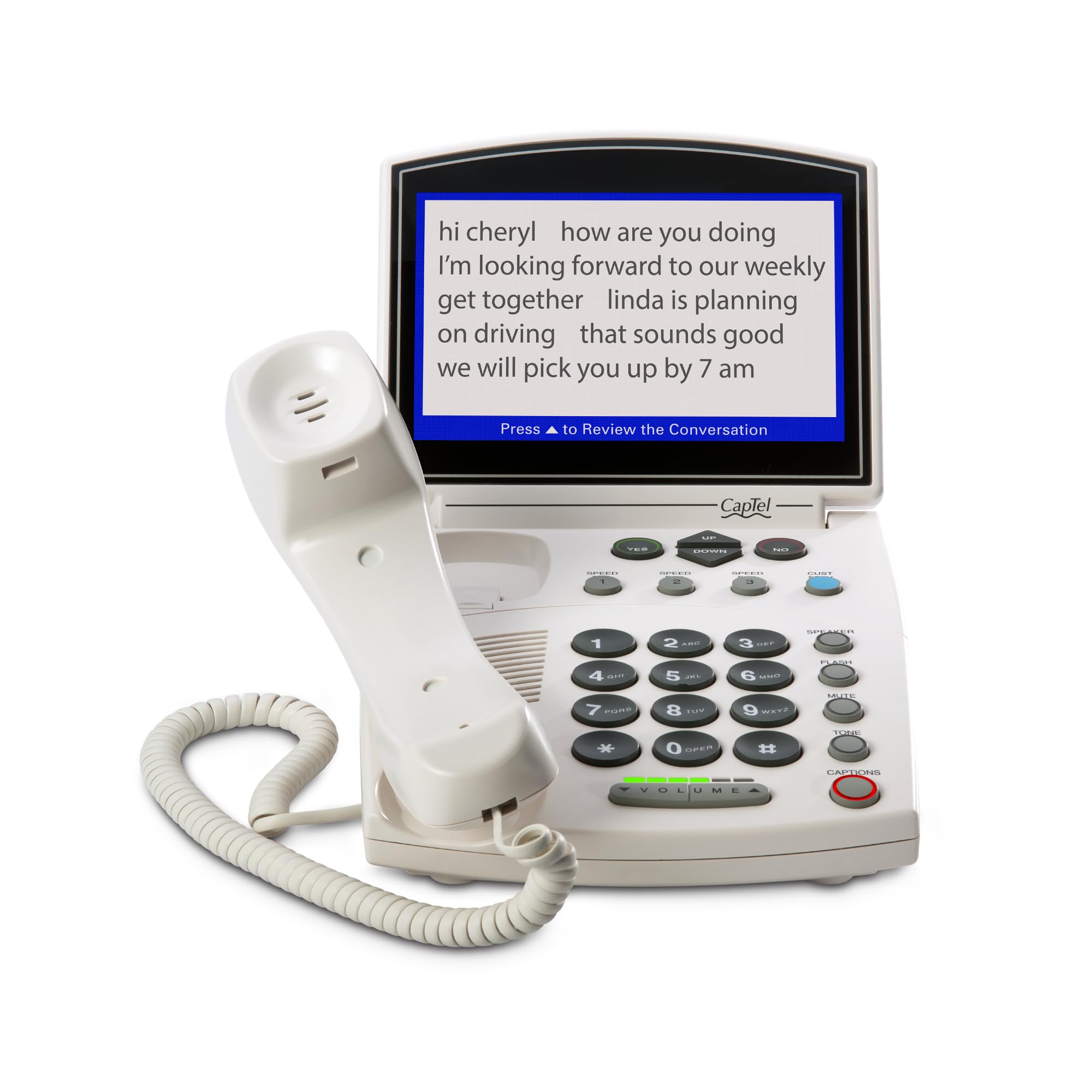
Hamilton CapTel 840i Captioned Telephone
- Large buttons alongside the big-screen caption display
- Straightforward, phone-like operation for anyone intimidated by touchscreens
- Amplification built in alongside captioning
- Screen is smaller than the 2400i's or 880i's
- Fewer customization options than newer models
VTech VG231 Amplified Phone with Large Display
- Big buttons and a large display at a lower price than captioned models
- No internet connection or account setup required
- Good starting point if it's unclear yet whether captioning is really needed
- Amplifies volume only — no live captioning
- Not a fix for hearing loss that persists even at higher volume
This Is a Different Fix Than an Amplified Phone
An amplified phone makes the call louder. A captioned telephone does something different: it uses a live transcription service to display what the other person is saying as text on a screen, in near real time, while the call happens normally through the handset or speaker. For moderate to severe hearing loss where volume alone doesn't solve the problem — a common situation once someone struggles to distinguish consonants even at higher volume — captions close a gap that amplification can't. The two aren't mutually exclusive; several captioned phones also amplify.
How the Captioning Service Actually Works
In the US, telephone captioning is provided under an FCC program intended for people with hearing loss, and the captioning service itself is free to use — the phone requires an internet connection (Wi-Fi or ethernet) to reach the captioning service, and setup usually asks for a short self-certification that the phone is for someone with hearing loss, since the program is funded for that purpose. The call itself still uses a regular phone line or the phone's own calling connection; the internet connection is only for pulling in the caption text.
Our Top Picks
These cover the core captioned-phone use case at different price points and screen sizes, rather than being variations on the same device.
What to Check Before Buying
- Wi-Fi requirement: confirm home internet reaches the room where the phone will sit, or plan for an ethernet run — captions won't work without a connection.
- Screen size and text size: if low vision is also a factor, prioritize the largest display and check that text size is adjustable, not fixed.
- Caption speed and accuracy: speed varies by model and by how the captioning is generated behind the scenes; read recent user reviews for the specific model rather than trusting marketing copy alone.
- Corded vs. cordless: a corded base with a cordless handset is common and reasonable — the base needs a fixed spot near power and a phone line or the internet connection either way.
When to Look at Video Calling Instead
If the senior is comfortable with a screen and family mostly wants to see them rather than just talk, a video calling device with its own captioning feature may cover more ground than a dedicated captioned phone. Our video calling devices guide covers Echo Show, Google Nest Hub Max, and Portal — several current video calling platforms now offer live captions during video calls as a built-in accessibility setting, on top of the visual benefit of lip-reading and facial expressions that audio-only calls don't provide.
How to Choose Based on Hearing and Vision
The right captioned phone depends less on brand than on the combination of hearing and vision you're working with. If hearing loss is the main issue and eyesight is still good, almost any captioned model works — focus on caption speed and how comfortable the handset feels. If low vision is also a factor, which is common as people age, prioritize the largest available screen, confirm the caption text size is adjustable rather than fixed, and favor high-contrast displays that are readable from a normal sitting distance. For someone who finds touchscreens confusing, a model with a familiar physical handset and real buttons alongside the screen is far less intimidating than a tablet-style interface, even if it looks less modern. And if the person still hears reasonably well with volume but struggles with specific words, look for a captioned phone that also amplifies, so they can listen and read at the same time and lean on the captions only when a word slips past.
Setup and Getting Started
A captioned phone asks for a little more setup than an ordinary phone, and it's worth doing carefully so it actually gets used. First, confirm home internet reaches the spot where the phone will live — captions won't appear without a Wi-Fi or ethernet connection, so if that corner of the house has weak Wi-Fi, plan for a wired connection or a Wi-Fi extender before the phone arrives. During setup you'll typically complete a short self-certification that the phone is for someone with hearing loss, since the captioning service is funded through the federal program for exactly that purpose. Once it's running, adjust the caption text size and the amplification with the person present, place a test call so they can watch the words appear in real time, and show them that captions lag a beat behind the voice — knowing that in advance prevents the common worry that something is broken. Set the phone somewhere with good light on the screen and program the numbers they call most.
What a Typical First Week Looks Like
Expect a short adjustment period rather than instant comfort. Day one is usually spent on the internet connection and the self-certification step, plus one or two test calls with a family member so the caption lag and occasional misread word stop feeling alarming. By the end of the first week, most users have stopped reading every caption word-for-word and started using them the way they're meant to be used — as a backup for the specific words or phrases that slip past, not a full transcript to follow instead of listening. If someone is still reading every caption on day ten and finding the call exhausting, that's usually a sign the text size or screen position needs adjusting, not that the device is a poor fit.
It's also worth telling frequent callers — adult children, a spouse who calls from work — that there's a beat of delay before captions appear, so they don't repeat themselves or talk over the pause thinking the line dropped. That one piece of context prevents most of the early frustration on both ends of the call.
Common Mistakes to Avoid
- Assuming it works like a normal phone out of the box. Captions require an internet connection and a short one-time setup; a captioned phone plugged in with no Wi-Fi reachable will simply act like an ordinary phone with no captions.
- Buying captioned when amplified is enough. For mild loss where volume is the whole problem, a simpler amplified phone avoids the internet requirement and account setup entirely.
- Overlooking screen and text size. Captions only help if they can be read comfortably — if vision is also declining, a small or fixed-size display defeats the purpose.
- Expecting instant, perfect captions. Captions arrive a moment behind the speaker and aren't always word-perfect; setting that expectation up front prevents frustration.
- Placing it out of Wi-Fi range. The most common real-world failure is simply a weak signal where the phone sits. Check the connection in that exact spot first.
Frequently Asked Questions
Is there a monthly fee for the captioning service?
No — the captioning service itself is funded through the FCC program and doesn't carry its own monthly charge. You'll still pay for the phone line or internet connection the household already has; the captioning add-on is what's free.
Do I need a landline, or does this work with internet-only phone service?
Most captioned phones work with either a traditional landline or a VoIP/internet-based phone service — check the specific model's compatibility, since not every VoIP provider works identically with every captioned phone's hardware.
Can family members call in normally, or do they need special software?
Family members call in exactly like any normal phone call — no app or special setup is needed on their end. The captioning happens only on the receiving captioned phone's side.
Does the other person on the call know their words are being captioned?
Typically yes — there's usually a brief automated notice at the start of the call letting the other party know captioning is in use, since a live agent or automated system is transcribing the conversation in real time.
What if hearing loss is mild and captions feel like overkill?
For mild hearing loss where volume is still the main issue, an amplified phone is simpler and doesn't require an internet connection or account setup. Our amplified phones guide covers decibel-rated options for that case — save captioned phones for when amplification alone stops being enough.
What happens if the internet goes out — can I still make calls?
In most cases the phone can still place and receive calls over its regular phone line; you just lose the captions until the internet connection comes back, since the captions are the only part that depends on the internet. If the phone relies on an internet-based (VoIP) calling connection rather than a traditional landline, an outage may affect calling too — worth confirming for the specific setup.
Are the captions private, or can someone else read my calls?
The captions appear only on the phone's own screen, in the room where the phone sits — they aren't broadcast or shared with anyone else in the household beyond whoever can see that screen. The captioning service transcribes the call to generate the text, which is inherent to how the FCC-funded program works, but the displayed captions themselves stay on the device.
Can one captioned phone be used by more than one person in the house?
Yes — anyone can pick up and use the phone, and the captions display for whoever is on the call. The self-certification during setup is about the phone being intended for a household member with hearing loss, not about locking it to a single user.
How do I get a captioned phone — do I have to buy it outright?
Captioned phones are sold directly by the manufacturers and some retailers, and because the captioning is delivered through a federal program, some states and programs offer captioned phones at low or no cost to residents who qualify for hearing-loss assistance. Eligibility and availability vary by state, so check your state's telephone equipment distribution program to see what's offered before paying full retail — and verify eligibility rather than assuming.
The Bottom Line
Captioned phones solve a specific problem — following speech that stays hard to understand even at higher volume — that amplification alone doesn't fix. They need an internet connection and a short setup, but the captioning service itself is free, and for the right situation it's the difference between avoiding phone calls and using them normally again.
A cell phone is a different piece of the same puzzle — see our hearing aid compatible cell phones guide for which mobile phones are actually rated to work cleanly with hearing aids, rather than just being loud.


