GrandPad Review (2026): Is the Senior Tablet Worth the Monthly Plan?
GrandPad is a locked tablet sold with a required plan. What reviewers agree on, Amazon vs Consumer Cellular vs GrandPad direct, a 30-day trial checklist, and who should buy an iPad instead. Researched, not hands-on; no prices.
As an Amazon Associate I earn from qualifying purchases. We independently review products; buying through our links never costs you extra.
Best for Low-Tech Seniors
GrandPad Easy to Use Tablet & Phone for Seniors

Our Top Picks
Chosen for seniors based on features, specs, and verified buyer reviews.
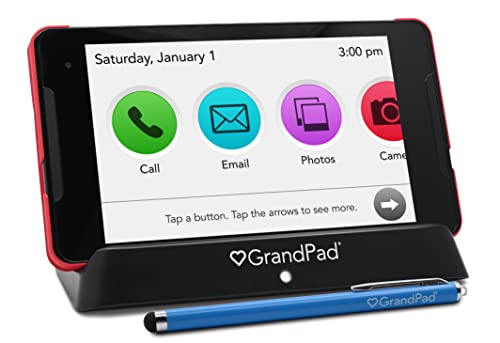
GrandPad Easy to Use Tablet & Phone for Seniors
- Simple big-icon interface (reviewers)
- Family manages contacts remotely
- Built-in mobile data; no home Wi-Fi needed
- Human customer support (reviewers)
- Requires an ongoing GrandPad plan
- Amazon unit is locked; not compatible with Consumer Cellular
- Limited apps and streaming
Updated October 23, 2026. Short answer: GrandPad is a locked-down tablet sold with a required service plan, built for older adults who can't or won't use a regular tablet. The reviewers we read agree it is simple and very well supported, and they agree the ongoing plan is the catch. It's a good buy for a parent with low tech confidence, memory decline or a history of scam calls, and a poor buy for anyone who could learn an iPad. This review is researched from GrandPad's and sellers' published information and from named reviews; we haven't tested one hands-on. Decide where you'll buy before you decide whether to buy: the Amazon unit is locked to GrandPad's own plans.
GrandPad at a glance
| Question | What the seller says (checked October 23, 2026) |
|---|---|
| What it is | An "all-in-one tablet + phone" for seniors with large icons and a private network that "blocks spam and scams" (Amazon listing) |
| What's in the box | Tablet, wireless charging cradle, protective case and stylus (Amazon listing and GrandPad shop page) |
| Connectivity | "Nationwide Mobile Data" with a footnote that "features may vary by plan" (grandpad.net); Wi-Fi is also listed among its connectivity options (Amazon listing) |
| Who manages it | Family members, through GrandPad Central and free companion apps for Android and iOS (grandpad.net, Amazon listing) |
| Support | U.S.-based customer care; TechRadar's review lists "24/7/365 phone support with real people" |
| 911 calling | "Available with select plans" (Amazon listing); "9-1-1 Calling Available*" with the same plan footnote (grandpad.net) |
| Plan required? | Yes. The Amazon listing says to call GrandPad to activate and choose a Basic, Premium or Ultimate plan (monthly or annual), and that functionality is limited without one |
| Trial | GrandPad advertises a 30-day money-back guarantee on its own site; confirm how it applies to your purchase channel before you buy |
Our verdict: worth it for the right person, and only if the family is ready to act as the administrator. Overkill for a senior who can already handle a phone.
Check price on AmazonGrandPad tablet (affiliate link). The Amazon unit is locked and needs a GrandPad plan; compare the other buying paths below.
What GrandPad actually is: a service, not just a tablet
The single most useful sentence about GrandPad comes from TechRadar's 2021 review: the tablet "has to be viewed as a service rather than a mere product." That's still the right frame. You aren't buying a cheaper iPad. You're buying a closed system: a tablet with a fixed set of curated apps, a private calling and messaging network, built-in mobile data, a support line, and a family dashboard. The hardware is the part you hold. The plan is the part you're really paying for.
Here is how it works day to day, based on GrandPad's own description. There's no app store and no passwords for the senior to remember. The home screen shows a small set of large icons: calls, video, photos, music, games, email, a calendar, a camera and a curated internet browser. Family members join the senior's private network through the companion app. Once they're in, they can video call, send photos and messages, and add or remove contacts. Because the family controls the contact list and GrandPad describes its network as private and built to block spam and scams, it's marketed as a defense against scam calls.
The family side is called GrandPad Central. A son or daughter (the "family administrator") manages who's on the contact list and what content shows up, without touching the tablet itself. That remote control is the feature that separates GrandPad from a regular tablet with a simplified home screen. It's also the reason someone in the family has to commit to running it.
GrandPad says its devices are shaped by "Grand Advisors," older adults who test the design, and markets a "90/90" promise that a 90-year-old can learn it in 90 seconds. That's a marketing line, not a measurement, but it tells you who the product is aimed at.
What reviewers agree on
We read the most-cited GrandPad reviews and pulled out only what they say, with the source and year. Some of these are a few years old, so treat older points about apps and pricing as things to re-check, not current facts.
Pros the reviewers share
- Simplicity. Reviewed calls it "a pick-up-and-play user experience" with no firmware updates or passwords to fight through. SeniorLiving.org (December 2025) describes "loud, front-facing speakers and large, bright icons."
- Real human support. TechRadar (2021) lists "24/7/365 phone support with real people" as a reason to buy. Yahoo Tech (January 2024) lists "superb live customer support available 24/7."
- Works without home Wi-Fi. Yahoo Tech highlights the built-in mobile service, "which eliminates Wi-Fi hassles." That matters for a parent who has no internet at home.
- Also works as a phone. Yahoo Tech lists "also functions as a phone" and "super-easy Zoom calls" as pros.
- Family control. TechRadar names the family administrator role as a strength.
Cons the reviewers share
- Ongoing cost. Every review we read flags the required plan. TechRadar's first con is simply "Expensive." Yahoo Tech's headline calls it "too darn expensive." Reviewed calls the subscription "a huge bummer considering what you can do on competing tablets with a standard Wi-Fi connection."
- Limited apps. Yahoo Tech (2024) lists "missing some key apps, including YouTube and social media." Reviewed notes that popular streaming services such as Netflix or Hulu don't work in GrandPad's browser. If your parent mainly wants to watch shows, this matters.
- No full screen reader. Reviewed says GrandPad stops short of the full screen reader found on Apple and Android devices, and suggests an iPad for people who need one.
- Warranty depends on where you buy. Yahoo Tech (2024) lists a "short warranty if purchased from Amazon." That's dated, so check the current warranty terms on whichever channel you use.
We didn't use Trustpilot or the Better Business Bureau for this section. Both had only a small number of GrandPad reviews when we looked, which is too few to call a consensus either way.
Where to buy GrandPad: Amazon vs Consumer Cellular vs GrandPad direct
This is the part most GrandPad reviews skip, and it's where families make expensive mistakes. The same basic product is sold through more than one channel, and the channel decides which plan you're on.
| Where you buy | What you get | Which plan it needs | Lock-in to know about |
|---|---|---|---|
| Amazon | The GrandPad tablet (listing B09S6THZJ1) | A GrandPad plan, activated by calling GrandPad | The listing title says "Locked - Not Compatible with Other Wireless Carriers - Requires a Plan," and the listing text says it's not compatible with Consumer Cellular |
| GrandPad direct | Tablet plus a GrandPad plan, bought from GrandPad | GrandPad's own plans | GrandPad's site says "features may vary by plan," so compare plans before you pick |
| Consumer Cellular | GrandPad sold by the carrier, with Consumer Cellular's own GrandPad plan | Consumer Cellular's GrandPad plan, which the carrier has said is separate from its phone plans | Consumer Cellular's GrandPad terms are in its own addendum. Check that the carrier still lists GrandPad before ordering |
We left prices out of this table on purpose. Third-party sites publish conflicting GrandPad prices across these channels, and plan prices change. The only numbers that count are the ones on the seller's page the day you buy.
The practical rule: if your parent already has, or wants, a Consumer Cellular phone plan, look at Consumer Cellular's GrandPad first. Don't buy the Amazon unit and expect to move it there. If you want GrandPad's own plan options and its money-back guarantee, buy direct or from Amazon, and read the plan page closely either way.
The real cost of owning a GrandPad (how to work it out)
We won't give you a dollar figure, because any number we printed would be out of date or wrong for your channel. But the math is simple, and you should do it before you order:
- Device: the tablet price on the seller's page, if it's sold separately from the plan.
- Plan: twelve months of the plan you'd actually use, or the annual plan price if one is offered. Make sure the plan includes the features your parent needs, such as 911 calling, which GrandPad and the Amazon listing both say depends on the plan.
- Extras: any protection plan, onboarding add-on or accessory you add at checkout.
Add those up and you have your first-year cost. After year one, the plan is the main ongoing cost. Then compare that total with the alternative: an iPad or Fire tablet you already know how to set up, plus the time you'd spend supporting it. For some families GrandPad is cheaper in the way that counts, because it saves weekly support calls. For others it's an expensive way to do what a configured tablet can already do.
Reviewed makes one fair point: if the device works for your parent, the plan is a cost that several siblings can split.
Who GrandPad is for
Reviewed puts it bluntly: GrandPad "is probably best suited for the strongly tech-averse or those suffering from severe cognitive disabilities." Based on what the sellers and reviewers describe, it fits best when most of these are true:
- Low tech confidence. Your parent has never used a smartphone comfortably, or has given up on one.
- Memory decline. Fewer choices on screen, no passwords and no app updates suit someone who's starting to struggle with new steps. If wandering is also a worry, a wearable is the bigger priority; see our guide to GPS trackers for seniors with dementia.
- Scam exposure. They've been targeted by phone or email scams before. GrandPad's family-managed contact list and private network are built for this. For a regular landline or cell phone, pair it with one of the call blockers for seniors we cover.
- No home Wi-Fi. The built-in mobile data means you don't have to set up or maintain internet at their home.
- A willing family administrator. Someone who will manage contacts, share photos and be the first call when something seems off.
It's also worth a look for a parent who has just moved into assisted living, where staff may not have time to help with a regular tablet and the built-in mobile data means you don't depend on the building's Wi-Fi.
Who should skip it (and what to buy instead)
If your parent could learn an iPad with some help, the ongoing plan is hard to justify. Here are the alternatives we'd look at first:
- They can learn a tablet: an iPad with Apple's Assistive Access. Apple describes it as "a distinctive iPadOS experience, with more focused features and a simplified user interface," designed for people with cognitive disabilities and set up by "a trusted supporter, such as a family member or caregiver." It gives you much of the simplicity with a far bigger app library and no required plan. Our best tablets for seniors guide covers which iPad to start with.
- Budget matters most: an Amazon Fire tablet, set up with large text and a short list of apps. See our best Amazon Fire tablet for seniors guide.
- Vision is the main problem: our tablets for seniors with low vision guide. Reviewed notes that people who need a full screen reader are better served by an iPad.
- They mainly want video calls with the grandkids: a countertop smart display may be simpler than any tablet. Our best video calling devices for seniors guide compares them, and our beginner's guide to setting up video calling for seniors walks through the first call.
- They mainly want to read: an e-reader. See our e-readers for seniors guide.
GrandPad vs iPad vs Fire tablet
The short version: GrandPad trades flexibility for control. An iPad or Fire tablet does more, costs nothing per month beyond your home internet, and has every app your parent might want, but someone has to set it up, update it and fix it, and the senior has to cope with an open device. GrandPad does less, needs a plan, and is managed remotely by family, which is exactly what some households need. If you're still deciding between the three device types rather than reviewing GrandPad specifically, read our full GrandPad vs iPad vs Fire tablet comparison. It goes through the locked-down versus open question in detail.
Your 30-day trial checklist
GrandPad advertises a 30-day money-back guarantee on its site. If you buy, use that window on purpose. Here's what we'd test before it closes:
- Video calls with at least three family members, including the least tech-savvy one. Does your parent answer without help?
- Photo sharing from the companion app. Send photos from two different phones and check they show up on the tablet.
- A call to customer care. Have your parent call with a simple question and see how it goes for them, not for you.
- Mobile data at their home. Test calls and video in the rooms they actually use, especially if their cell signal is weak.
- 911 on your plan. Confirm in writing whether your plan includes 911 calling, because both GrandPad and the Amazon listing say it depends on the plan. Don't place a test call to 911.
- Charging. Watch whether your parent puts it back on the cradle without being reminded. A dead tablet helps no one.
- Cancellation. Before day 30, find out exactly how to cancel and get a refund through the channel you bought from, and write it down.
If two or more of these fail, it's probably the wrong device, and the guarantee is there for that reason.
Frequently asked questions
Is GrandPad worth it?
GrandPad is worth it for seniors who can't manage a regular tablet: people with low tech confidence, memory decline or a history of falling for scams, whose family is willing to manage the device remotely. Reviewers consistently praise its simplicity and 24/7 human support, and consistently flag the required service plan as the main drawback. If the person could learn an iPad, an iPad set up with Apple's Assistive Access is usually the more flexible choice.
Does GrandPad have a contract or monthly fee?
Yes, it needs a service plan. The Amazon listing says to call GrandPad to activate and choose a Basic, Premium or Ultimate plan, paid monthly or annually, and that the tablet has limited functionality without one. GrandPad's FAQ covers long-term commitment and its 30-day money-back guarantee, so read the current terms on the plan page before you buy.
Can I buy a GrandPad on Amazon and use it with Consumer Cellular?
No. The Amazon GrandPad listing says the tablet is locked, requires a GrandPad plan, and is not compatible with Consumer Cellular or other carriers. Consumer Cellular sells GrandPad separately with its own GrandPad plan, so choose your buying path before you order.
Is GrandPad good for someone with dementia?
It can be, especially in the earlier stages. Reviewed says GrandPad is probably best suited to the strongly tech-averse or people with severe cognitive disabilities, and a family-managed contact list means fewer strangers and fewer confusing choices. It won't help with wandering, though. For that, look at a wearable GPS tracker. Talk with the person's care team about what fits their stage.
Can GrandPad replace a cell phone?
GrandPad markets it that way, saying it "can replace your home phone, cell, and computer with a single solution," and the Amazon listing calls it a tablet and phone. But it's a tablet, not something you carry in a pocket, and GrandPad notes that features, including 911 calling, vary by plan. Check your plan before you cancel any existing phone line.
What's the best alternative to GrandPad?
For a senior who can learn a little, an iPad with Apple's Assistive Access gives a simplified home screen without a required plan. For a tighter budget, an Amazon Fire tablet set up with large text and a few apps works. For someone who only wants video calls, a countertop smart display is often simpler than any tablet.
The bottom line
GrandPad does one job very well: it gets an older adult who would never use a regular tablet onto video calls and photo sharing with family, inside a closed system the family controls. You pay for that every month, and the reviewers are right that it's expensive next to a tablet you can set up yourself. Buy it if your parent fits the profile above and someone in the family will be the administrator. Pick the buying channel first, add up the first-year cost from the seller's own page, and use the 30-day window to test it properly. If your parent could manage an iPad with Assistive Access, start there instead.
Check price on AmazonGrandPad tablet (affiliate link). Locked to GrandPad plans; not compatible with Consumer Cellular.
Sources
- GrandPad official site (features, plan footnotes, 30-day money-back guarantee), checked October 23, 2026
- Amazon listing for GrandPad, ASIN B09S6THZJ1 (title, activation and plan wording, included components), checked via the Amazon Creators API on October 23, 2026
- GrandPad senior tablet review, TechRadar, June 2021
- GrandPad review: A pricy but accessible tablet for seniors, Reviewed
- GrandPad review: A great tablet for grandparents, but too darn expensive, Yahoo Tech, January 2024
- GrandPad review, SeniorLiving.org, December 2025
- Assistive Access User Guide for iPad, Apple
Affiliate disclosure: Senior Tech Review earns a commission on qualifying Amazon purchases (tag bestproducts20d-20). Links to GrandPad and Consumer Cellular are not affiliate links. We don't print prices because they change and differ by channel. Read more on our About page.


