Roku vs Fire TV Stick for Seniors (2026): Which Is Easier?
Roku or Amazon Fire TV for a parent or grandparent? We compare home screens, remotes, voice search, and setup, with four in-stock picks checked October 13, 2026.
As an Amazon Associate I earn from qualifying purchases. We independently review products; buying through our links never costs you extra.
Best for Simplicity
Roku Ultra Streaming Player (4K)
Quick picks
| Product | Best for | Amazon |
|---|---|---|
| Roku Ultra Streaming Player (4K) | Simplicity | Check price on Amazon |
| Amazon Fire TV Stick 4K (Newest Model) | Alexa Homes | Check price on Amazon |
| Amazon Fire TV Stick HD (Newest Model) | Older 1080p TVs | Check price on Amazon |
| Amazon Fire TV Stick 4K Plus | Fire TV Picture | Check price on Amazon |

Our Top Picks
Chosen for seniors based on features, specs, and verified buyer reviews.

Roku Ultra Streaming Player (4K)
- Rechargeable Voice Remote Pro with backlit buttons, per the listing
- Lost remote finder and hands-free 'Hey Roku' voice control
- 4K, HDR10+, Dolby Vision, and Dolby Atmos
- A set-top box rather than a stick, so it needs a spot near the TV
- Costs more than any stick on this page
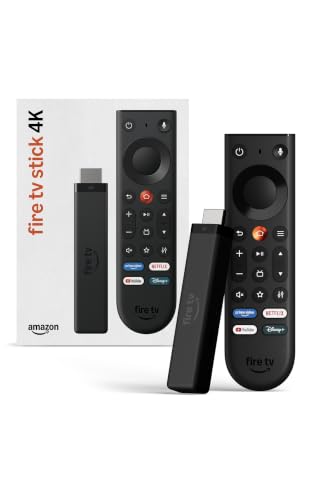
Amazon Fire TV Stick 4K (Newest Model)
- New remote with TV power, volume, and one-click Live TV buttons
- Direct Power: runs off the TV, no wall adapter, per the listing
- 4K with HDR10+ and Wi-Fi 6
- Home screen has more rows of recommendations to scroll past
- Works best if you already use Amazon services

Amazon Fire TV Stick HD (Newest Model)
- Full HD streaming with Wi-Fi 6
- Powered by the TV with the included USB-C cable
- Alexa Voice Remote with Alexa+
- No 4K, so it's wasted on a 4K TV
- Same busier home screen as other Fire TV devices

Amazon Fire TV Stick 4K Plus
- Dolby Vision, HDR10+, and Dolby Atmos
- Wi-Fi 6 for smoother streaming on busy networks
- Alexa+ voice search
- More than most seniors need for basic streaming
- Cloud gaming features add menus a non-gamer won't use
Product details checked October 13, 2026, through Amazon's product data. Every pick showed as new and in stock that day. We don't print prices because they change daily, and we didn't run our own speed tests.
Quick answer: For a senior who just wants to turn on the TV and open Netflix, YouTube, or a free channel, Roku is usually the simpler platform. Its home screen is a plain grid of apps you can arrange, and the Roku Ultra comes with a backlit, rechargeable remote with a lost remote finder. Choose an Amazon Fire TV Stick 4K instead if the household already uses Alexa or Prime Video, or if you want a stick that hides behind the TV and runs off the TV's own power. On an older 1080p TV, the Fire TV Stick HD is enough.
Check price on Amazon: Roku Ultra
Roku vs Fire TV at a Glance
These details come from each product's Amazon listing as of October 13, 2026.
| Roku Ultra | Fire TV Stick 4K | Fire TV Stick HD | Fire TV Stick 4K Plus | |
|---|---|---|---|---|
| Form | Set-top box | Stick | Stick | Stick |
| Picture | 4K, HDR10+, Dolby Vision | 4K, HDR10+ | Full HD | 4K, Dolby Vision, HDR10+ |
| Remote highlights | Backlit, rechargeable, lost remote finder, hands-free voice | TV power and volume, Live TV button | Alexa Voice Remote | Alexa Voice Remote |
| Voice assistant | Roku voice / 'Hey Roku' | Alexa+ | Alexa+ | Alexa+ |
| Power | Not stated on listing | Runs off the TV (Direct Power) | Runs off the TV (USB-C) | Not stated on listing |
| Best for | Simplest experience | Alexa and Prime homes | Older 1080p TVs | Best Fire TV picture |
The Biggest Difference: The Home Screen
For older viewers, the menu matters more than picture specs. Roku's home screen is a grid of app tiles (Netflix, YouTube, PBS, and so on) that you can rearrange so the two or three apps they use most sit at the top left. It stays the same day after day, which helps with memory and vision changes.
Fire TV's home screen is built around recommendations, with rows of shows and content categories. The listing for the newest Fire TV experience describes dedicated content categories, the ability to pin more favorite apps, and personalized recommendations from Alexa+. That's great for discovering something new and less great for someone who gets lost when the screen changes. Both platforms show some promoted content.
The Remote
Remotes are where most seniors struggle. The Roku Ultra includes the Voice Remote Pro, which the listing says has backlit buttons, hands-free voice control (say "Hey Roku"), a lost remote finder, and a rechargeable battery that lasts months on a charge. Backlit buttons help in a dim living room, and the lost remote finder solves the most common call to the grandkids.
The newest Fire TV Stick 4K comes with a redesigned Fire TV remote that the listing says includes TV power and volume controls, a navigation ring, and dedicated buttons for Live TV and a shortcut panel. If the main issue is small, crowded buttons, a large-button universal remote can control either device; see our large-button TV remotes guide.
Check price on Amazon: Fire TV Stick 4K
Voice Search: Roku Voice vs Alexa
Voice search removes the hardest part of streaming: typing with arrow keys. Both platforms let you hold a button and say the show or app name. Fire TV uses Alexa+, which the listings say can find shows across apps and control smart home devices. If your parent already has an Echo, Fire TV fits right in, and our smart speakers guide explains how Alexa works for seniors. Roku's voice control is more focused on TV: search, play, and open apps.
Setup and Power
The Fire TV Stick 4K and Fire TV Stick HD listings both describe Direct Power: the stick draws power from the TV, so there's no extra wall plug. That's a real win behind a wall-mounted TV. The Roku Ultra is a small box that sits near the TV and connects with an HDMI cable. Either way, plan to do the setup yourself: sign in to the apps, arrange the home screen, and turn off autoplay if it confuses them.
Which One to Buy
Roku Ultra: Best for Simplicity
Pick the Roku Ultra for the simplest day-to-day experience and the best remote on this page. The listing says it is the fastest Roku player and supports 4K, HDR10+, Dolby Vision, and Dolby Atmos. It's the choice for a parent who lives alone and needs things to work the same way every day.
Fire TV Stick 4K: Best for Alexa Homes
Pick the Fire TV Stick 4K for a 4K TV in a home that already uses Alexa, Prime Video, or Ring cameras. Its new remote adds TV power and volume, and it hides behind the TV with no wall adapter.
Fire TV Stick HD: Best for Older TVs
Pick the Fire TV Stick HD for a 1080p bedroom or kitchen TV. It streams in Full HD with Wi-Fi 6 and runs off the TV's power.
Fire TV Stick 4K Plus: Best Fire TV Picture
Pick the 4K Plus for a high-end 4K TV with Dolby Vision. The listing also mentions cloud gaming, which most seniors won't use.
Why No Roku Stick?
When we checked Amazon on October 13, 2026, the new Roku Streaming Stick models were listed only as renewed units or not yet in stock. We only recommend new, in-stock products, so the Roku Ultra is our Roku pick. If you can find a new Roku Streaming Stick elsewhere, it gives the same simple Roku home screen in a stick.
Setup Tips for a Parent or Grandparent
- Arrange the home screen so their top three apps are first.
- Write the app logins on a card kept with their important papers, not taped to the TV.
- Turn on captions in the device settings if hearing is an issue, and see our TV listening devices guide.
- Turn off autoplay previews if moving pictures on the menu are confusing.
- Show them the voice button first. It's the easiest way to find anything.
Still choosing a TV? Our smart TVs for seniors guide covers TVs with Roku or Fire TV built in, and our streaming devices guide covers other options.
How We Picked
We compared what matters for older viewers: the home screen, the remote, voice search, and setup. We pulled listing details and stock status from Amazon's product data on October 13, 2026, and included only new products that showed as in stock that day. We didn't run speed or Wi-Fi tests ourselves, and we don't invent ratings or prices.
The Bottom Line
Roku wins on simplicity, and the Roku Ultra's backlit, findable remote is the best on this page for seniors. Fire TV wins for Alexa households and for a stick that hides behind the TV. Either way, a half hour of setup by a family member matters more than which logo is on the box.
Frequently Asked Questions
Is Roku or Fire TV easier for seniors?
Roku is usually the easier choice for someone who just wants to open Netflix or YouTube. Its home screen is a simple grid of app tiles you arrange yourself. Fire TV is just as capable, and the better fit if the household already uses Alexa or Prime Video, but its home screen has more rows of recommendations to scroll past.
Which streaming device has the best remote for seniors?
The Roku Ultra's Voice Remote Pro has backlit buttons, hands-free voice control, a lost remote finder, and a rechargeable battery, per the listing. The newest Fire TV Stick 4K remote adds TV power and volume buttons plus one-click Live TV, per its listing. If small buttons are the problem, pair either one with a large-button universal remote.
Do I need a 4K streaming stick?
Only if the TV is 4K. On an older 1080p TV, the Fire TV Stick HD does the job. If the TV is 4K or likely to be replaced soon, a 4K device is worth it.
Can seniors use voice search on Roku and Fire TV?
Yes. Both remotes have a voice button. You hold it and say a show name or app. The Roku Ultra remote also supports hands-free 'Hey Roku,' and Fire TV uses Alexa+, per the listings.
Is there a monthly fee for Roku or Fire TV?
No. You buy the device once. Paid apps like Netflix or Hulu need their own subscriptions, and both platforms offer free, ad-supported channels and live TV.
Why isn't the Roku Streaming Stick on this page?
When we checked Amazon on October 13, 2026, the new Roku Streaming Stick models were only listed as renewed or not yet in stock. We only recommend new, in-stock products, so the Roku Ultra is the Roku pick here.


